n8n looks free until you count the part where you become the hosting company.
The software cost is easy. The decision is not. n8n's current pricing page lists Cloud Starter at €20 per month billed annually for 2,500 workflow executions, and Cloud Pro at €50 for 10,000. The self-hosted Community Edition costs nothing, but n8n expects you to bring the server, HTTPS, backups, upgrades, and the person who notices when the box stops answering.
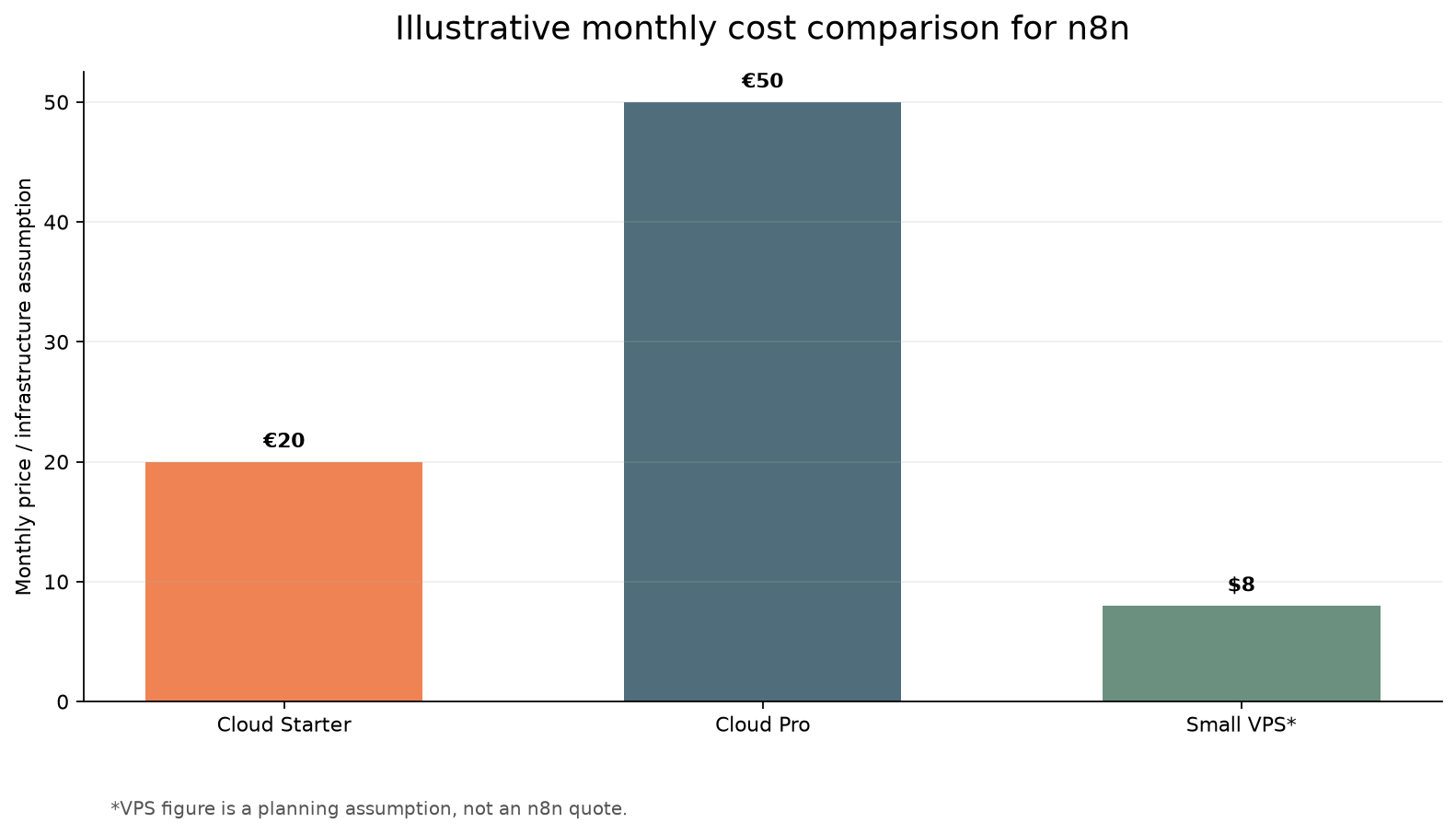
That makes the useful question narrower than "is self-hosting cheaper?" It is this: how many executions do you run, and how much is your attention worth? For a hobby workflow that runs 300 times a month, paying for Cloud may be buying peace. For a busy webhook pipeline that crosses 2,500 runs quickly, the cheap VPS starts looking much more sensible. Then the first failed backup arrives.
The break even math
Start by counting executions, not nodes. n8n defines an execution as one complete workflow run. A workflow with 15 nodes still consumes one execution, which is much friendlier than tools that bill every step.
Use this quick estimate before picking a plan:
- A daily workflow: about 30 executions per month.
- A workflow that runs every five minutes: roughly 8,600 to 8,900 executions per month.
- A webhook workflow: daily trigger count becomes the monthly total.
Those examples come from n8n's own pricing guidance. They also expose why a flat subscription can become awkward. A five-minute poller blows past the 2,500-execution Starter allowance in roughly nine days. Cloud Pro covers 10,000 runs, but the price rises to €50 per month.
Now use a deliberately boring workload. Say you have a CRM sync that runs hourly, a notification workflow with 200 events per day, and an invoice workflow with 10 events per day. That is about 7,020 executions in a month. Cloud Starter cannot cover it. Cloud Pro can, at €50 per month billed annually. A small VPS assumption of $5 to $12 per month leaves a large raw price gap, even before you add an LLM API bill.
That is the attractive part. It is also where bad comparisons cheat. The VPS number is not an n8n price. It is an infrastructure assumption gathered from current hosting and community examples. Your actual bill depends on storage, backups, bandwidth, database choice, and whether you already have a server running other services. Currency conversion also matters, so do not pretend €50 and $8 are precise savings without putting them in one currency.
The break even point is therefore not exactly 2,500 runs. It is the point where your avoided Cloud bill is worth more than the monthly server bill plus your maintenance time. If a VPS costs $8 and takes you 45 minutes a month to patch, inspect, and back up, it is cheap only if those 45 minutes are worth less than the difference. If a missed webhook costs a sale, the arithmetic changes again.
The maintenance bill
n8n's Docker documentation is unusually blunt: self-hosting requires knowledge of servers and containers, resource management and scaling, security, and n8n configuration. That is four separate jobs hiding behind the phrase "just run Docker."
The boring jobs are the ones that decide whether self-hosting is a bargain:
Backups: A Docker volume is persistence, not a backup. The .n8n directory contains more than the SQLite database. n8n documents that it can also hold encryption keys, logs, and source-control assets. Copying the database while forgetting the encryption key can leave credentials unusable after a restore.
Updates: n8n says it releases a new minor version most weeks. Pin the image to a version, read the release notes, and keep a rollback path. Pulling latest into production because it is convenient is not a deployment strategy.
Execution storage: Finished runs accumulate. n8n provides EXECUTIONS_DATA_PRUNE=true, EXECUTIONS_DATA_MAX_AGE=168, and EXECUTIONS_DATA_PRUNE_MAX_COUNT=50000 as controls. Without pruning, a workflow that handles large payloads can turn an inexpensive server into a storage and memory problem.
Webhooks: A public webhook is an internet-facing application. Use authentication where the node supports it, validate signatures inside the workflow when a service provides them, and put the editor behind HTTPS and access control. Do not expose the editor on a random port and call the job finished.
The self-hosted option wins for people who already maintain Linux services. It is a poor deal for someone who wants to learn automation and has no plan for outage alerts, domain renewal, or restore testing.
A safe small deployment
For a first instance, keep the shape small: one Linux VM, Docker Compose, one persistent n8n volume, HTTPS through a reverse proxy, and a fixed encryption key stored outside the compose file. n8n recommends Docker for most self-hosting needs because it isolates the application and makes environment management easier.
A minimal workflow looks like this:
services:
  n8n:
    image: docker.n8n.io/n8nio/n8n:2.35.6
    ports:
      - "127.0.0.1:5678:5678"
    environment:
      - N8N_ENFORCE_SETTINGS_FILE_PERMISSIONS=true
      - N8N_ENCRYPTION_KEY=${N8N_ENCRYPTION_KEY}
      - GENERIC_TIMEZONE=${GENERIC_TIMEZONE}
      - TZ=${TZ}
      - EXECUTIONS_DATA_PRUNE=true
      - EXECUTIONS_DATA_MAX_AGE=168
    volumes:
      - n8n_data:/home/node/.n8n

volumes:
  n8n_data:
The loop after startup matters more than the YAML. Confirm the editor is reachable through HTTPS, trigger a test webhook, inspect the execution, restore a backup into a disposable instance, and then update one version at a time. If the workflow handles binary data or concurrent bursts, stop treating this as a tiny deployment. n8n's queue mode uses Redis and separate workers for scaling, and its docs warn that filesystem binary storage does not work with queue mode. That is a different bill and a different operating model.
My decision rule is simple. Pick Cloud Starter when you are under 2,500 executions and do not want server chores. Pick Cloud Pro when the workload fits under 10,000 and the managed editor is worth €50. Pick Community Edition on a VPS when you exceed those limits, already know Docker, and can name your backup and outage procedure. If you cannot answer the last part, Cloud is not expensive. It is the person you have not had to hire yet.
Sources
- n8n pricing: current Cloud tiers, execution definitions, Community Edition, and feature limits
- n8n Docker installation: recommended container setup, persistent data, PostgreSQL notes, and update path
- n8n deployment choices: Community Edition versus Cloud tradeoffs and self-hosting requirements
- n8n execution data management: pruning environment variables and retention controls
- n8n scaling overview: queue mode and execution scaling guidance
- r/n8n cost discussion: community estimates for small VPS hosting costs