The dangerous part of an AI coding agent is not that it can write a bad function. It is that the same process can often read your SSH directory, edit a Git hook, call a production endpoint, and start a container through your host Docker socket. A clever prompt is not a permission system.
Docker Sandboxes give that agent a separate microVM, filesystem, network path, and Docker daemon. That sounds like a security story, but the useful question is much narrower: which files do you want the agent to change, which websites should it reach, and which tools are allowed to act on your behalf? The answer determines whether a sandbox is actually helping or merely adding a new command to your setup.
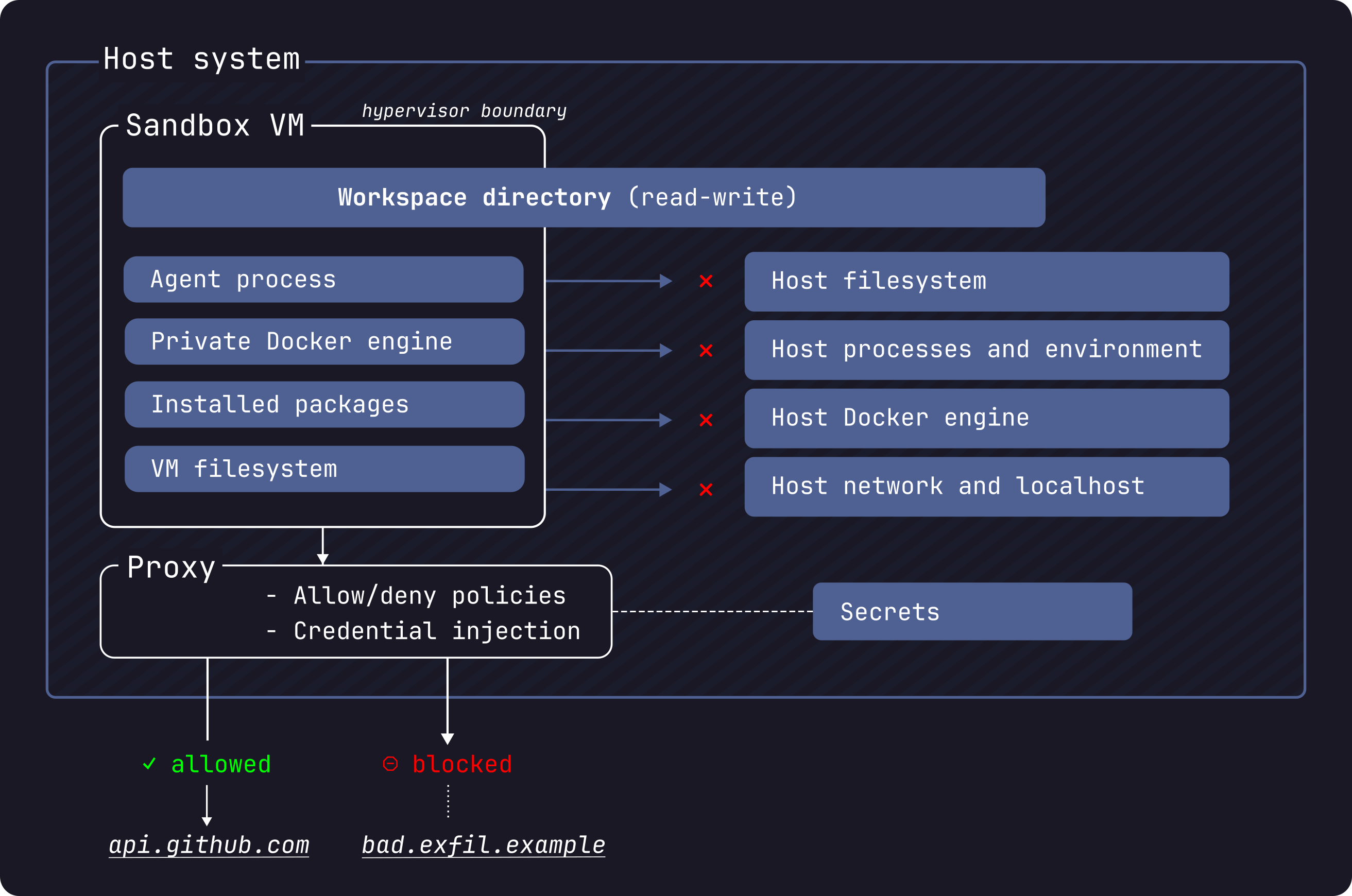
The safe default
Start with a sandbox that has no workspace mount when you are evaluating a new agent or an unfamiliar project. The current Docker CLI allows the path to be omitted:
sbx create claude
sbx run --name claude-scratch
That gives the agent its own working directory. Files it creates stay inside the sandbox, and its installed packages, images, and agent state persist until you remove the sandbox. It can still build and test software, but a mistake cannot silently rewrite the checkout sitting in your home directory.
For a real repository, clone mode is the better default than a read-write bind mount:
cd ~/src/my-project
sbx create --clone claude .
sbx run --name my-project
Docker mounts the host repository read-only at /run/sandbox/source, then gives the agent a private clone inside the VM. Commits come back through the sandbox Git remote. You review and merge them from the host instead of letting an agent edit your active working tree while it is still reasoning.
Direct mounting is convenient, and Docker makes the edits visible immediately. It is also the mode most likely to surprise you. The agent can change files that execute indirectly during development, including package.json scripts, Makefiles, CI configuration, Git hooks, and AI instruction files. A normal git diff does not show changes inside .git/hooks, so inspect that directory separately after any autonomous run.
The practical rule is simple. Use a direct mount for a trusted assistant doing a small, supervised edit. Use clone mode for parallel agents, repository exploration, dependency installation, or any task where you would rather review a commit than watch every write.
Network policy matters just as much. On the first run, Docker offers three presets: Open, Balanced, and Locked Down. Balanced uses default deny with common development sites allowed. Locked Down blocks everything until you add an exception. For a coding agent, Balanced is a reasonable starting point, but check it rather than trusting the label:
sbx policy ls
sbx policy allow network registry.npmjs.org
If the project needs a model provider, a package registry, and a source host, allow those domains and nothing else. A sandbox with a writable checkout and unrestricted outbound access still has plenty of room to do damage through your own code, dependencies, or external services.
The tool boundary
MCP changes the shape of the problem. An MCP server is a bridge to another system, such as GitHub, Linear, Notion, or a browser. Docker MCP Toolkit packages those servers as containers and applies useful defaults: each MCP tool container is limited to 1 CPU and 2 GB of memory, it has no host filesystem access unless you grant a mount, and requests containing sensitive information can be intercepted. Docker also signs catalog images and includes an SBOM.
Those controls reduce the blast radius of the MCP container. They do not turn every connected service into a read-only service. If you authorize GitHub with permission to open pull requests, the agent can still ask the GitHub server to open one. Treat local stdio MCP servers with extra suspicion: Docker's own Sandbox security guide says they run on the host, outside the sandbox VM. A host process launched through a local MCP integration has host permissions, not microVM permissions.
Create separate profiles for separate jobs. A read-only research profile might contain a web search or documentation server. A coding profile might add GitHub. A release profile should be rare, reviewed, and disconnected when you are not using it. Do not make one giant profile called everything and then rely on the model to choose wisely.
In Docker Desktop 4.62 and later, the Toolkit setup is:
- Enable MCP Toolkit under Docker Desktop settings and Beta features.
- Create a profile for the project.
- Add only the MCP servers required by the task.
- Connect the client to that profile.
- Run the client's health check before asking for edits.
For Claude Code, the gateway can be wired with:
{
  "mcpServers": {
    "MCP_DOCKER": {
      "command": "docker",
      "args": ["mcp", "gateway", "run", "--profile", "my_profile"]
    }
  }
}
Then verify it from the project directory:
claude mcp list
claude "Use the GitHub MCP server to show me my open pull requests"
The second command is deliberately read-only. Start with a query that proves the connection and the scope. Do not begin by asking an agent to merge code, delete issues, or modify cloud infrastructure.
What breaks first
The first failure is often a missing file rather than a security bug. A direct mount and a clone have different paths and different expectations. If the agent cannot find the repository, run pwd, git status, and git remote -v inside the sandbox before changing the mount flags. If the agent can see too much, remove the sandbox and recreate it with no path or in clone mode; trying to repair a broad bind mount after the fact is easy to get wrong.
The second failure is a client timeout. Docker's MCP documentation says the gateway usually takes about 15 to 25 seconds to start and recommends a 60-second startup timeout for clients that expose that setting. A ten-second default can make a healthy gateway look broken. Increase the timeout, then run claude mcp list again. Do not work around an unhealthy status by adding the same MCP server manually in several places. That creates duplicate tools and makes the effective permission set harder to reason about.
The third failure is network overreach. A package install might work under Balanced while a test that calls a private service fails under Locked Down. Inspect the policy, add one domain, rerun the smallest failing command, and record why the exception exists. A broad wildcard is fast today and difficult to audit later.
Resource limits can also confuse debugging. An MCP server capped at 1 CPU and 2 GB may be fine for GitHub metadata and poor for a browser or document conversion job. That limit is a reason to split profiles and servers by task, not a reason to grant a tool access to the host. For a cloud sandbox, sbx create defaults to 2 CPUs and 4 GiB when you do not set resource flags. If a build needs more, set the amount explicitly and keep the repository boundary intact.
Finally, remember that a sandbox does not review the code for you. In direct mode, the agent can alter a script that your editor or shell runs later. In clone mode, the agent can still produce a malicious or simply wrong commit. Run tests in the sandbox, inspect the diff on the host, check hooks and generated configuration, and only then merge.
The recipe I would use is boring by design: a mountless scratch sandbox for experiments, clone mode for real repositories, Balanced or Locked Down networking, one MCP profile per job, and a read-only health check before any write action. Isolation handles the mistakes that a model cannot see. Your review handles the mistakes that isolation cannot stop.
Sources
- Docker Sandboxes overview: microVM model, sandbox lifecycle, and supported workflows
- Docker Sandbox security model: trust boundaries, clone mode, network rules, credentials, and host-side MCP behavior
- Docker sbx create reference: workspace choices, clone mode, network flags, and the 2 CPU and 4 GiB cloud default
- Docker MCP Toolkit documentation: Docker Desktop 4.62 requirement and 1 CPU, 2 GB MCP container limits
- Docker MCP Toolkit setup guide: profiles, client connection, health checks, and the 15 to 25 second gateway startup guidance
- NestFrontier browser-agent container checklist: why container startup flags are only one part of agent isolation
- NestFrontier Activepieces MCP hosting guide: durable hosting considerations for MCP workflows