A product pull request merges. The feature is live, but its documentation still describes last month’s behavior. Most teams accept that lag as normal because the code and docs live in separate repositories, with separate permissions and review queues.
Microsoft’s Aspire team tried a more disciplined version of AI automation. Its workflow turned merged product changes into draft documentation pull requests in a separate repository. In the team’s published 30-day window, 82 documentation PRs were merged, all 82, with a median delay of 44.8 hours after the product PR. That is a useful result, but the design matters more than the headline: the model drafted; engineers reviewed; narrowly scoped automation handled the write.
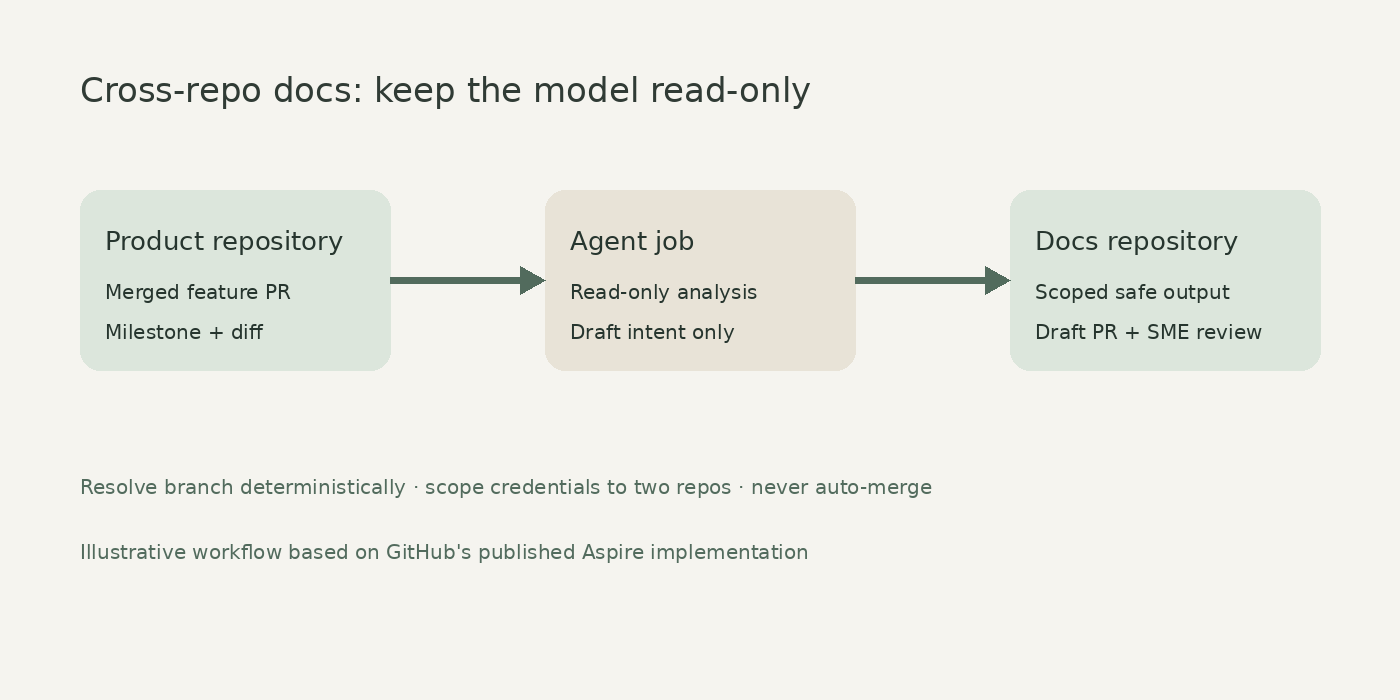
This is the setup worth copying. Not “give an agent a token and ask it to keep docs current.” The useful pattern is a bounded drafting pipeline with deterministic routing and a human at the merge button.
Workflow blueprint
Start when a product pull request closes, then add a condition so the job continues only when the PR actually merged. This avoids paying for abandoned branches and closed-without-merge work. Restrict the trigger to the product branches that ship user-facing changes.
Before the agent starts, resolve the documentation branch with ordinary code. Aspire checks the product PR’s milestone first and maps it to the matching docs release branch. If that is missing, it checks linked issues for a milestone, then tests whether the PR’s base branch matches a release naming pattern. Only then does it fall back to main. The order is intentional: branch selection is routing logic, not a creative task. A model should never guess whether a 13.4 change belongs on release/13.4 or main.
Give the agent the product diff, linked issue context, and the docs repository’s writing rules. Ask one narrow question before it edits anything: does this change affect something a user sees or does? The Aspire team’s first version over-triggered on internal changes such as CI tweaks, tests, and logging refactors. They tightened the prompt with a definition of user-facing changes and explicit counterexamples. That is a better fix than adding more model calls.
The target docs repository must be checked out into the workflow workspace before a cross-repo pull-request output can be created. Configure the safe-output handler for a single target repository, set allowed destination branches, cap the number of PRs per run at one, and make every PR a draft. Protect files the agent should not rewrite, such as dependency manifests and security or agent instructions. Where possible, use a GitHub App installed only on the product and docs repositories instead of a personal token with organization-wide reach.
Keep the agent’s own access read-only. It should propose a structured create-pull-request output; a separate handler applies that output using the narrow credential. The engineer who reviewed the feature PR is a sensible docs reviewer because they already know what shipped. Do not auto-merge. A good first version creates a draft, assigns the subject-matter expert, and posts the draft link back on the source PR.
In practical terms, the implementation has four pieces: a merged-PR trigger, deterministic branch resolver, a read-only agent with just enough context, and a constrained output job that opens one reviewable draft. GitHub’s gh aw extension compiles Markdown workflow definitions into ordinary Actions workflow files, but the compiled file is still part of the security boundary. Review it as code before merging, and keep it committed beside the source Markdown so reviewers can inspect the exact automation that will run.
Failure checks
First, test routing with real examples before enabling the trigger broadly. Include a feature on a release branch with a milestone, a linked issue carrying the milestone, a PR with only a release-style base branch, and a change with no release metadata. Confirm each maps to the intended docs branch. If metadata conflicts, fail closed or open an issue for a person; do not silently invent a destination.
Second, test the “no docs needed” path. Run the workflow against a dependency bump, test-only change, and internal refactor. Those should finish without opening a docs PR. Aspire reported 396 workflow runs and 82 docs PRs in the measurement window, so most merged product changes correctly did not become documentation work. The filter is part of the product, not a nuisance to remove.
Third, test the permission boundary. Confirm the app installation covers only the required repositories, the output handler cannot target arbitrary repositories or branches, and the draft PR cannot change protected files. A token that can write everywhere because “it is only a bot” is still a broad credential. Also avoid privileged GitHub Actions triggers that check out untrusted pull-request code; GitHub’s security guidance calls out that combination as a repository takeover risk.
Fourth, make failure visible. A missing target checkout, unavailable credential, invalid branch, or rejected safe output should produce an actionable failed run or fallback issue, not a green check with no draft. Inspect the Actions logs and generated PR on the first few runs. If the workflow opens false-positive PRs, tighten the decision examples and run again before increasing its scope.
The numbers deserve a little skepticism. The 82 of 82 merge result is a company case study, not an independent controlled trial, and the 44.8 hours measures the complete human review process, not model drafting time. The result does show that this team shipped a workflow people accepted. It does not prove the same prompt will work on every repository, or that documentation quality improved without review.
The useful decision is simple. If your product and docs already share permissions and a predictable release branch, ordinary CI plus a draft PR may be enough. If they live in separate repositories, start with one user-facing feature path, scoped credentials, deterministic branch routing, and draft-only output. Add more triggers only after the false-positive and permissions tests stay clean. For recurring workflows, budget and cost controls matter too; our guide to capping Agentic Workflows costs covers that separate problem.
Sources
- Aspire cross-repository documentation case study: workflow design, safeguards, and 30-day results
- GitHub Agentic Workflows cross-repository reference: target checkouts, scoped safe outputs, and repository restrictions
- GitHub Agentic Workflows overview: setup model, read-only defaults, safe outputs, and cost reporting
- GitHub Actions secure-use reference: least privilege and risks around untrusted pull request code