A 125B model usually starts with a shopping list: 96GB or 128GB of memory, a workstation motherboard, and the kind of electricity bill that makes a local AI hobby feel like a small data center. Slotstream takes a different route. It keeps Qwen3.8-Flash-Next's expert weights on an SSD and pulls the pieces it needs into a cache while the model runs.
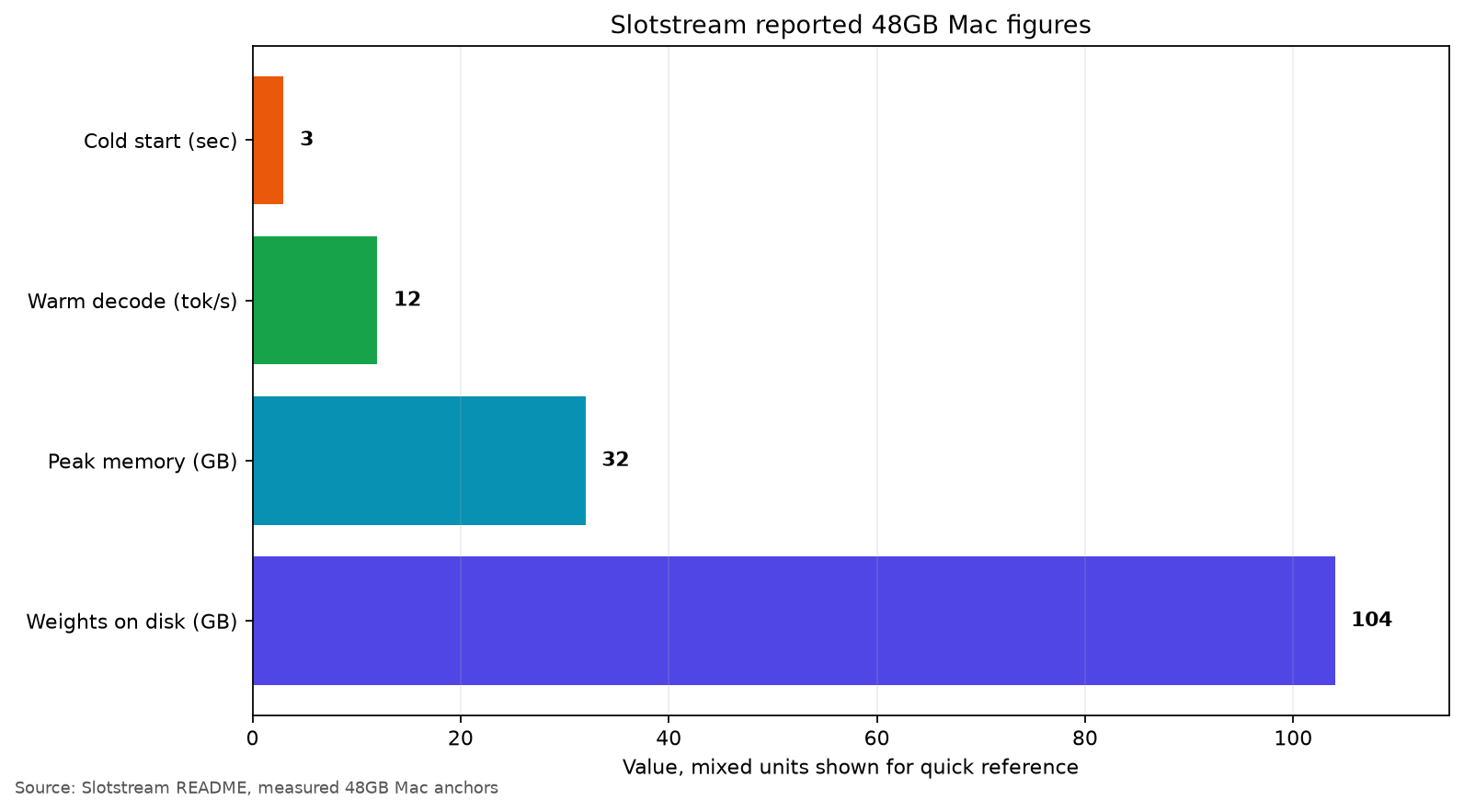
The result is a strange but useful proposition. The Qwen checkpoint is 104GB at 4-bit, yet the project reports about 32GB peak memory, about 12 tokens per second of warm decoding, and a roughly 3-second first token after launch on a 48GB Apple Silicon Mac. Those are not numbers for a generic Mac. They are the project's measured anchors on an M5 Pro with 48GB, while the smaller memory tiers are estimates from the same curve.
That distinction matters. Slotstream changes the question from "Can the whole model fit in RAM?" to "Can my SSD and memory system keep the active experts moving fast enough?" For a Mac owner who wants a large local model without buying a 128GB machine, that is a worthwhile trade. For someone expecting cloud-like latency on long prompts, it is a trap.
The memory trick is simple, the model is not
Qwen3.8-Flash-Next is a mixture-of-experts model with 125B total parameters and about 6B activated per token, according to Qwen's release material. The total checkpoint is still enormous because inactive expert weights have to live somewhere. Standard local runtimes tend to load a quantized copy into RAM or unified memory. That is where a 48GB Mac loses before generation starts.
Slotstream instead streams expert weights from storage. Its README describes a shared cache across the model's 48 layers, with the runtime sizing the working set for the machine. On the reported 48GB system, the process targets about 33GB and reaches around 32GB peak memory. The rest of the machine keeps some breathing room, which is a much saner default than letting a local runtime consume every available byte and turn macOS into a swap benchmark.
The project is written in Swift with MLX support and exposes Ollama-compatible and OpenAI-compatible chat and generate endpoints. That makes the experiment more practical than a one-off research demo. An existing Ollama client, Open WebUI installation, or small OpenAI SDK script can talk to the server without learning a new protocol.
There is another important detail in the model itself. Qwen lists 48 layers and a 262,144-token context limit for Flash-Next, alongside its hybrid attention and large n-gram embedding component. A maximum context number is not a promise that a 48GB laptop will process a quarter-million tokens comfortably. Slotstream's own measurements show why: generation can stay around 12 tokens per second, but prefill is the painful part for long prompts.
Who should use Slotstream
Use it if you have Apple Silicon, macOS 14 or newer, and at least about 110GB of free disk space before downloading anything. The 104GB weight footprint is the headline number, not the complete install budget. You need room for the files, the runtime, the operating system, and temporary activity. A 512GB Mac is the realistic floor if this is not the only thing on the drive.
Run the project's doctor check before pulling the weights. That is the right order of operations. It reports the machine's memory plan and warns when the available disk or memory makes the setup a bad idea. Downloading a 104GB model to discover afterward that the cache will page is an avoidable mistake.
A 48GB owner should expect the most convincing experience with short prompts, repeated conversations, and workloads where local data matters more than instant replies. The README reports a warm decode rate of about 12 tokens per second and a cold start to first token of about 3 seconds on the measured machine. Follow-up turns can reuse up to 32,768 tokens of prefix state across four conversations, so a long-running chat does not pay the complete prefill cost every time.
The API compatibility is useful too. You can run the server on its documented local port and point an Ollama client at it, or use the OpenAI-shaped endpoint from a script. The supported sampling controls include temperature, top-p, top-k, minimum-p, penalties, seed, stop sequences, and a token limit. Unsupported features return a clear 400 rather than pretending they worked. That last behavior is boring, but it is exactly what you want from a local service.
The same decision looks different on smaller Macs. Slotstream estimates about 10 tokens per second on 32GB, 8 on 24GB, and 5 on 16GB. Only the 48GB row is measured on physical hardware, and the author notes that SSD speed and thermal behavior will move the result. Treat those rows as planning numbers, not a benchmark promise.
Where Slotstream breaks
The first failure is storage. A model that fits in 32GB of active memory still occupies 104GB on disk. The SSD is now part of the inference engine, and the performance of that SSD matters. The project measured download throughput plateauing in the 36 to 57MB/s range after four parallel connections on Hugging Face, even when the network link could deliver 134MB/s to an ordinary host. The model may take 30 to 50 minutes on a fast connection, and much longer on a slow one.
The second failure is prompt length. Slotstream reports roughly 125 tokens per second for prefill on the 48GB setup, but the prompt still has to be processed before generation starts. An 8,000-token prompt is a different experience from a 15-token prompt. The README puts the former at roughly 70 seconds before the first generated token in its longer-prompt discussion. That is acceptable for a private document analysis job. It is awful for a chat interface where the user expects every turn to feel immediate.
The third failure is feature coverage. The current server supports common chat and generation paths, but the README explicitly lists tools, images, JSON-schema output, log probabilities, and alternate model names as unsupported. If your agent depends on function calling, this is not a drop-in replacement. It is a large local text model with a familiar HTTP surface, not a complete hosted-model clone.
There is also a concurrency limit. The runtime enforces one model process at a time. Prefix reuse helps a set of conversations, but that does not turn a laptop into a multi-user inference server. A single developer or a private research box is the intended shape. Put it behind a shared team endpoint and the queue becomes part of the product.
The community reaction on Hacker News landed in roughly the same place. The fresh Show HN thread focused on the possibility of starting at 16GB and the appeal of running a 125B model without 100GB of RAM. Other commenters immediately asked how useful 12 tokens per second is and questioned the estimated 16GB result. Those are the right questions. The project has made the memory wall less absolute, not removed the physics of storage bandwidth, prefill, and thermal limits.
My call is straightforward. If you already own a 48GB Apple Silicon Mac and have 110GB of disposable disk space, Slotstream is worth trying for private coding context, document work, and experiments with a larger MoE model. If you are buying hardware specifically for it, do not treat SSD streaming as a reason to underbuy memory. The 104GB checkpoint still costs storage, long prompts still cost time, and unsupported tool calls still require another runtime.
That is what makes the project interesting. It is not a claim that 48GB Macs have become equivalent to 128GB workstations. It is a reminder that model size and working memory are different constraints, and a carefully chosen runtime can trade one for the other. Sometimes that trade is exactly what a local setup needs.
Sources
- Slotstream GitHub repository: measured 48GB Mac results, memory planner, commands, API limits, and download behavior
- Qwen3.8-Flash-Next model card: model files, local serving paths, context information, and community evaluations
- Qwen3.8-Flash-Next technical release: 125B total parameters, 6B activated parameters, and model design details
- Fresh Hacker News discussion: community questions about 48GB hardware, 16GB estimates, and 12 tok/s usability