An AI agent can draft an email safely. The dangerous moment is when it gets the button that sends it. In n8n, you can put a human approval gate on selected tools, so the agent keeps handling routine work while a person sees the proposed action before the irreversible part runs.
This is a better control than telling the model “be careful.” Prompt instructions are probabilistic. A tool-level review is an execution boundary: the workflow pauses, shows a reviewer the tool and its parameters, and runs the action only after approval. The feature arrived in n8n 2.6; the current docs describe approval channels including Slack, Telegram, Chat, Gmail, Teams, and others.
Gate only actions with real consequences
Start by listing every tool attached to the agent and sorting by what happens if the tool call is wrong. A read-only lookup usually does not need a person in the loop. Sending an external message, modifying a customer record, deleting data, making a purchase, or writing to production does.
That distinction matters. If every harmless lookup pauses for approval, people learn to click “approve” without reading. If no write action is gated, the model’s confidence becomes your access-control policy. Neither is a great design.
A practical first pass:
- Leave read-only search and retrieval tools ungated, unless the data itself is sensitive.
- Require review for external messages, record changes, deletes, purchases, and production writes.
- Keep permissions narrow even on gated tools. Approval is a second check, not a replacement for least privilege.
- Start with more review, then remove gates only after you have evidence that the workflow behaves well.
The decision is about consequence and reversibility, not how smart the model sounds. A perfectly written email can still go to the wrong person.
Make the approval request reviewable
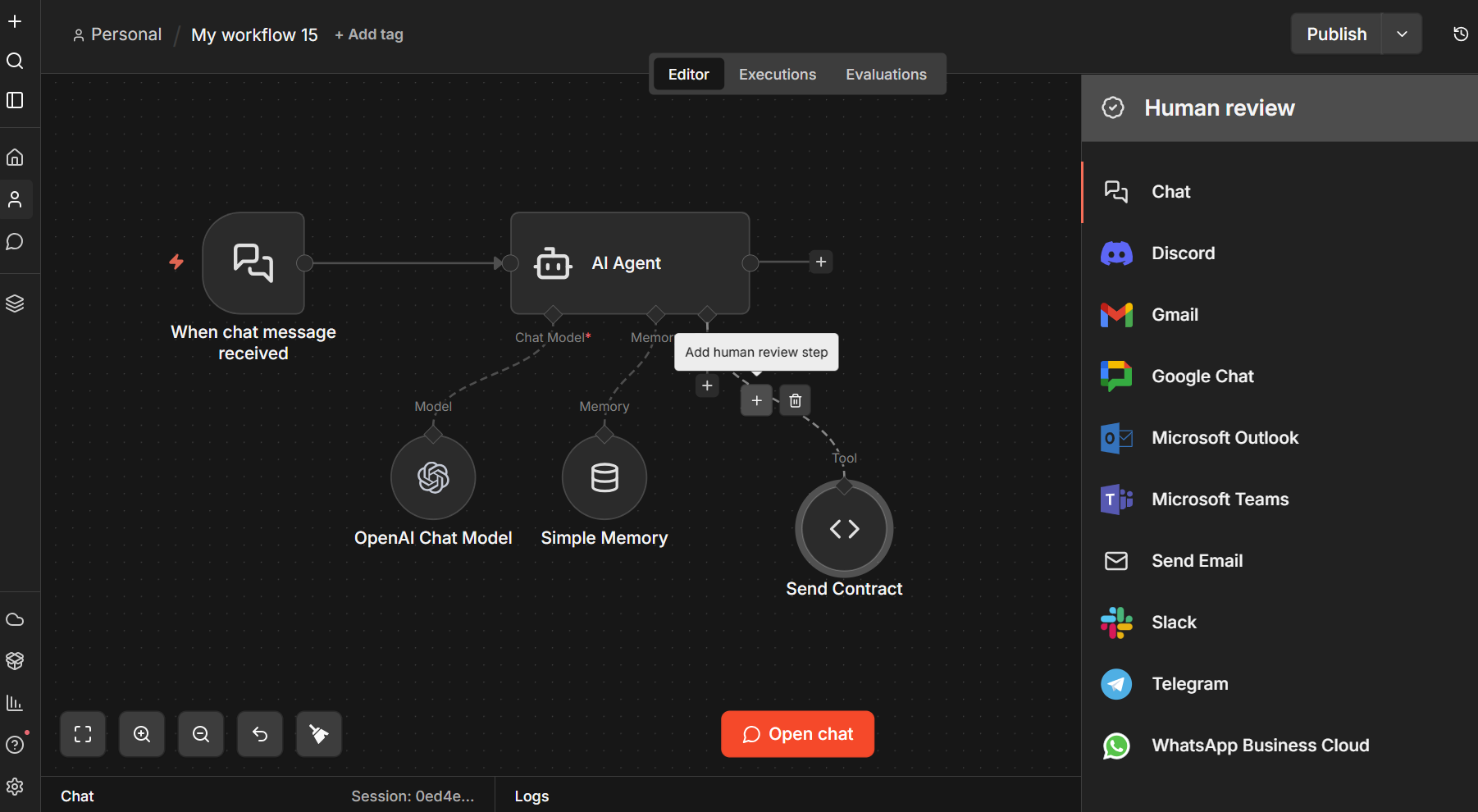
Open the AI Agent’s Tools connector. In the Tools Panel, choose a human review channel, configure its credentials, then connect the sensitive tool through that review step. The agent pauses when it tries to call that tool. The reviewer can approve the call, which executes using the AI-specified input, or deny it, which cancels the action.
Do not send reviewers a vague “Agent needs approval” notification. The official n8n docs expose $tool.name and $tool.parameters for constructing a message. A useful prompt is:
The AI wants to use {{ $tool.name }} with these parameters:
{{ JSON.stringify($tool.parameters, null, 2) }}
If the tool uses $fromAI() for dynamic values, those values are included in the parameters the reviewer sees. That lets a person check the actual recipient, amount, record ID, or message body instead of approving an abstract intention. Give tools clear node names too: “Send refund email” is more useful than “HTTP Request 4.”
Then tell the agent what a denial means. For example: “If a tool call is denied, do not retry it or call an equivalent tool to perform the same action. Tell the user it was denied and offer a safe next step.” n8n’s documentation specifically recommends explaining which tools require approval and how the agent should respond to rejection. This prevents a rejected action from turning into a loop of near-identical requests.
Test the denial path before production
Before enabling a live workflow, make a harmless test tool or use a sandbox account. Check four cases: approval executes the exact displayed parameters; denial leaves the external system unchanged; the agent reports denial without retrying; and the reviewer channel receives the request with enough context to decide. Test a bad recipient or record ID on purpose. If it is hard to spot in the approval message, improve the message before going live.
Also test what happens when nobody answers. A paused approval is not the same as a safe timeout. The n8n production playbook gives four hours as an example wait limit and suggests defaulting to “do not send” for customer-facing workflows. Pick a timeout that fits your process, and make expiry fail closed: no response means no external action. Record who approved or denied and when, so you can reconstruct a disputed run.
There is one useful boundary to keep in mind. Human review protects the action that is gated. It does not prove the agent’s research is correct, ensure the reviewer reads carefully, or protect an ungated tool that can achieve the same outcome. Gate equivalent write paths, keep access scoped, and include the consequential values in the approval request.
For code changes, this action-level checkpoint pairs well with a layered review loop for agent-written code. In both cases, the principle is the same: let the agent do reversible work quickly, then put a person where a mistake leaves the system.
Sources
- n8n human-in-the-loop tool documentation: setup, approval behavior, channels, and reviewer parameters
- n8n changelog: records human-in-the-loop for AI tool calls in n8n 2.6
- n8n production AI playbook on human oversight: practical timeout, fail-closed, and audit guidance