A 16.76GB model file is a seductive number. It fits on a 24GB graphics card, so the obvious conclusion is that the whole local agent stack fits too. That conclusion is wrong often enough to waste a weekend.
Meta's Muse Glimmer 30B arrived on August 10 as an open-weight model aimed at always-on agents rather than ordinary chat. It is a dense model with a roughly 1.8B-parameter perception encoder, a 131,072-token configured context, tool calling, image input, and a DFlash drafter for speculative decoding. The release is interesting because it turns local agent deployment into a fairly clear hardware decision. It is also a good test of whether we have learned to read model announcements as deployment documents instead of shopping brochures.
The short version is simple. If you already own 24GB of VRAM or unified memory, start with the K-Quant-17GB build and text-only inference. If you have 32GB, the K-Quant-Dynamic build gives you more breathing room and Meta reports 0.2% average degradation across 15 benchmarks, versus 1.0% for K-Quant-17GB. If you have less than 24GB, do not buy hardware based on the model filename. Wait for independent measurements or use a hosted endpoint.
The 24GB decision
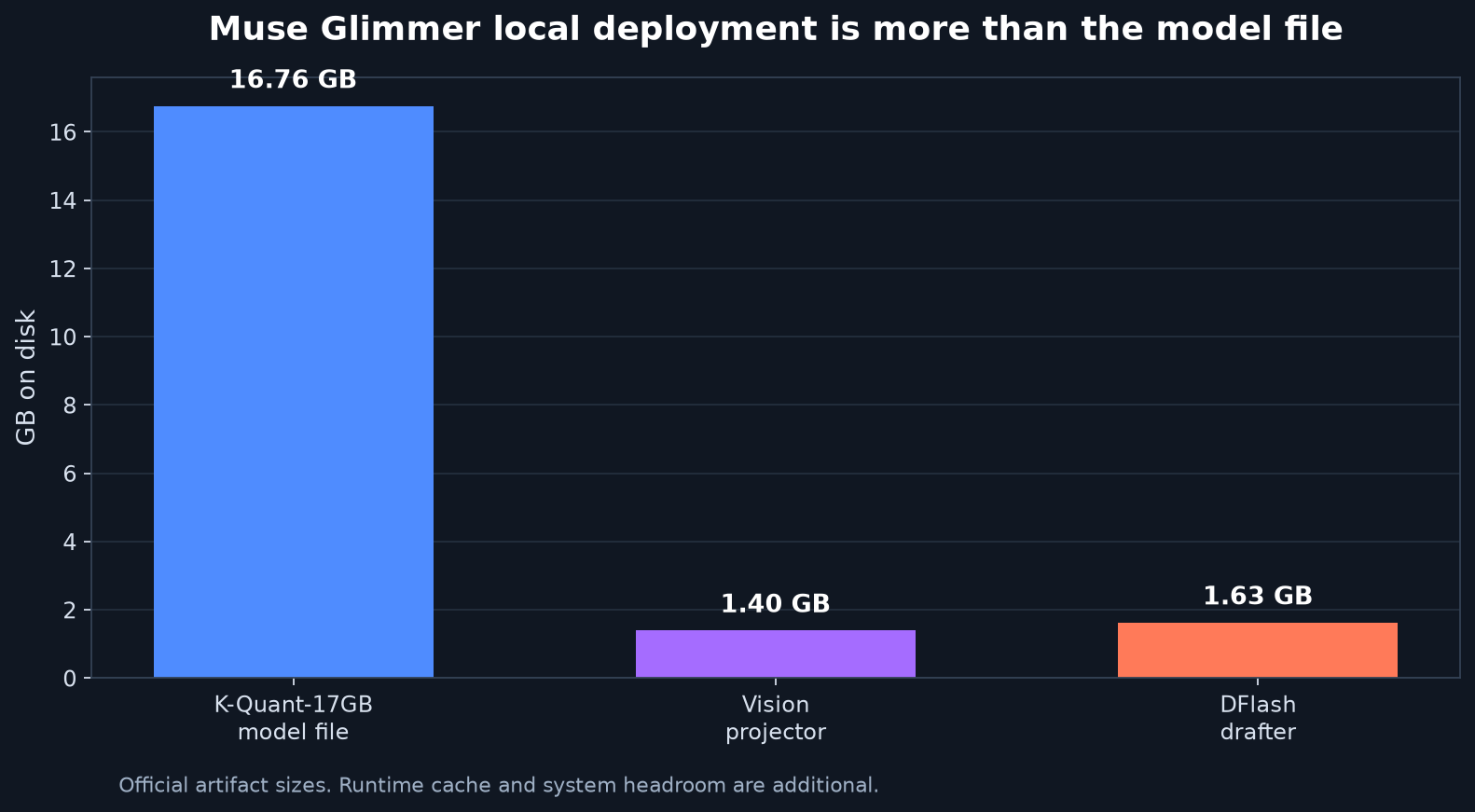
The model card lists three useful deployment envelopes. Full precision targets 64GB of VRAM. K-Quant-Dynamic targets 32GB. K-Quant-17GB targets 24GB. Those figures are not interchangeable with the weight sizes. The small GGUF is 16.76GB. The optional vision projector is about 1.40GB, and the DFlash drafter is about 1.63GB. The runtime also needs a KV cache, temporary buffers, the operating system, and whatever context your agent feeds back after each tool call.
That is why 24GB is a minimum validated envelope, not a promise that every 131K-token session will work. A local agent spends memory on its history in a way a short chat does not. A shell listing, compiler log, screenshot, and retrieved document all become part of the next prompt. The context setting is a ceiling. It is not a sensible starting point.
For a 24GB card or Mac, use the smallest quantized artifact. Keep the context modest, disable image input, and run a small repeatable task before you attach a filesystem or browser. A 32GB machine can use the dynamic quantization path, but it still needs a context budget. More memory does not make arbitrary tool output free.
The speed claim is more interesting than the parameter count. Meta reports 74.9 tokens per second without speculation and 233.4 tokens per second (233.4 tok/s) with DFlash on an RTX 5090, a 3.1x difference in its batch-one, greedy-decoding test. On an M4 Max, the reported numbers are 23.7 and 37.8 tokens per second, or 1.5x. Those are useful reference points, not a guarantee for your setup. The tests use different runtimes, and agent latency includes prompt processing, tool execution, file reads, and waiting for the next action.
A faster decoder helps most when the model is already making good decisions. It cannot rescue a bad tool schema or an agent that keeps rereading the same 100,000-token log. In practice, trimming context and constraining tool output may improve the experience more than turning on a larger speculation block.
What the benchmark table does and does not prove
Muse Glimmer's launch table is strong in some agent rows and ordinary in others. Meta reports 75.5 on MCP Atlas, 74.6 on DeepSearch QA, 43.3 on GAIA2, and 51.2 on SWE-Bench Pro. The same table gives Qwen3.6-27B higher scores on SWE-Bench Verified, TerminalBench 2.1, OSWorld-Verified, and several multimodal tests. Gemma4-31B leads on GPQA Diamond and the lower-is-better safety measures shown for CI Memories and Siren AgentDojo.
That mixed result is the useful result. It says Glimmer is not a universal replacement for every 27B model. Its pitch is the combination of agent training, local hardware fit, image input, and a first-party quantization path. If your workload is terminal coding and Qwen already works, a new model score does not justify a migration. If your workload needs local tool calls, screenshots, and data that cannot leave the machine, the tradeoff looks different.
The community reaction on Hacker News followed the same split. The launch thread reached about 1,200 points and 637 comments. One commenter said Glimmer barely edges Qwen on the published numbers except for tool calling. Another described the model's tone as cocky but its thinking traces as terse. Those are impressions rather than evaluations. They point to the question that matters: does it complete your task with your tools, under your memory limit, without leaking data?
Meta's table also needs a provenance label in your head. Some rows come from Meta's own runs, some use third-party or vendor-reported values, and the scaffolds, prompts, tool schemas, and revisions are not interchangeable. Treat the numbers as launch evidence. Re-run the task with the exact runtime before you rewrite a production agent around them.
A safer first run
The official Hugging Face guide gives a direct llama.cpp path. Start with the baseline, then add one component at a time:
llama serve -hf meta-models/Muse-Glimmer-30B-GGUF
The local OpenAI-compatible endpoint is available at http://localhost:8080/v1. Point a test client at it and run a text-only prompt that produces a structured answer. Record load time, prompt length, generation speed, peak memory, and whether the output follows the requested schema. Do not begin with a browser, shell, email, or calendar tool.
Once the baseline is stable, add the vision projector and test one image task. Then try the DFlash path:
llama serve -hf meta-models/Muse-Glimmer-30B-GGUF \
  --spec-type draft-dflash \
  --spec-draft-n-max 15
Compare the same prompt with and without the drafter. Keep the run cold and warm, and write down peak memory. If the model starts swapping, truncating context, or producing malformed tool calls, the speed number is irrelevant.
Only after that should you expose tools. Give the agent read-only access first. Use an allowlist, bind the server to loopback, keep outbound network access off unless the task needs it, and require confirmation for writes. This is not paranoia for its own sake. Meta's model card reports a 28.4% attack success rate on its Siren AgentDojo setup, alongside 94.2 utility. That is a benchmark result under a particular scaffold, not a production safety certificate. Local weights reduce one class of data exposure; they do not make a tool-using agent trustworthy by default.
The model's Apache 2.0 weights are permissive, but open weights are not the same thing as a reproducible training release. The data pipeline is not fully published, and Meta's separate usage policy still applies. Teams shipping a product should review both before assuming that a downloadable checkpoint settles their legal obligations.
Muse Glimmer is worth testing if you already have the hardware. It is a particularly sensible experiment for a 24GB owner who wants local coding or document work and can tolerate a staged setup. It is a poor reason to buy a new machine on the strength of a 16.76GB filename, and it is not a reason to replace a model that already wins your real tasks. The most honest deployment plan is boring: fit the smallest build, measure your workload, keep the agent boxed in, and only then decide whether the model earned a permanent place on the machine.
Sources
- Meta's Muse Glimmer announcement: release goals, training approach, local deployment rationale, and supported agent capabilities
- Muse Glimmer model card on Hugging Face: memory targets, benchmark table, DFlash measurements, safety notes, and hardware variants
- Hugging Face Muse Glimmer integration guide: llama.cpp commands, multimodal examples, vLLM support, and local endpoint setup
- NVIDIA's local Muse Glimmer deployment guide: dense architecture, local GPU options, and serving paths
- Hacker News launch discussion: community reaction and the mixed reading of Glimmer's comparison results