The most useful part of LLM 0.32 is not that it can call more tools. Plenty of wrappers can do that. The useful part is that Simon Willison’s CLI now gives those calls a shape you can inspect, pause, resume, pipe, and back up without writing a small orchestration service first.
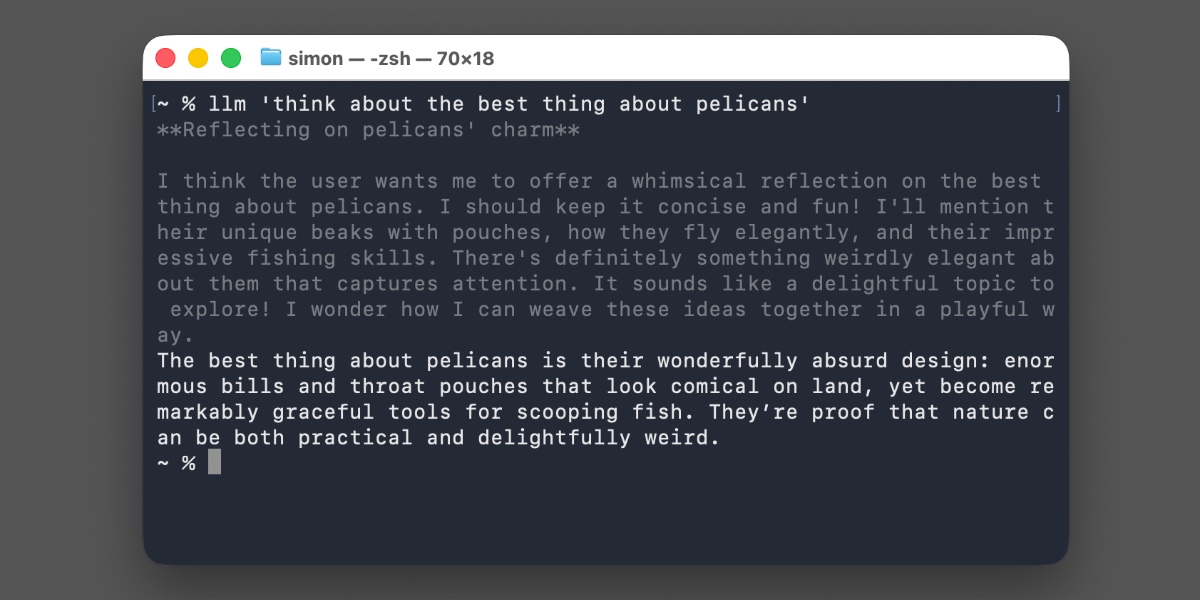
Released on August 4, 2026, version 0.32 changes the internal unit from “a string came back” to a structured turn made of messages and typed parts. A part can be normal output, a reasoning summary, a tool call, a tool result, or an attachment. That sounds like API housekeeping until a tool loop fails halfway through. Then it becomes the difference between restarting blindly and continuing from a known state.
The release also switches reasoning-capable OpenAI models to the Responses API by default, adds provider hosted tools, and introduces a content addressed SQLite message store. The combination makes LLM look less like a chatbot command and more like a small agent runtime that happens to fit in a terminal.
A workflow worth copying
Start with the boring part: install it in an isolated environment and check what the selected model can actually do. The model capability list matters because server side tools belong to the provider, not to the CLI itself. A model may support WebSearch while another only supports ordinary text generation.
uv tool install llm
llm -m gpt-5.6-luna --options
llm tools -m gpt-5.6-luna
For an OpenAI Responses model, a search-enabled prompt is a one-liner:
llm -m gpt-5.6-luna -T WebSearch \
  'Find the latest SQLite release and return the version, release date, and official URL'
Code execution works the same way. The documented example lets the provider run CodeInterpreter with a 4g memory limit:
llm -m gpt-5.6-luna \
  -T 'CodeInterpreter(memory_limit="4g")' \
  'Use Python to calculate factorial(13) * 3 and return only the integer'
The important shell detail is that reasoning summaries go to standard error. The final answer stays on standard output, so you can send it to another command without accidentally feeding the model’s internal trace into your parser. If you want a completely quiet pipeline, use the documented -R hide-reasoning switch.
llm -R -m gpt-5.6-luna \
  'Return a JSON object with the keys version and official_url' \
  > result.json
That is a small change with a real operational payoff. A human at a terminal can watch the reasoning summary. A scheduled job can suppress it. Neither needs a second wrapper to split logs from data.
The same interface reaches other providers through plugins. The llm-anthropic 0.26 release adds WebSearch, WebFetch, CodeExecution, and an AnthropicMCP connector. LLM 0.32 can record those server-executed calls as structured parts, and a continued conversation can restore its configured tools with llm -c. This does not turn every model into a reliable autonomous worker. It does make the boundary between model, tool, and result visible enough to debug.
The backup step is where the release stops being a neat CLI demo and becomes useful infrastructure:
llm logs backup logs-backup.db
llm logs --json --tools
llm logs list --tools -n 10
The new store keeps messages once and references them by content hash. Repeated conversation history is not copied into every turn as a new blob. The raw provider payload remains available through the turn record, while the JSON form of llm logs expands the stored data into a form scripts can consume. If an agent run matters, back up the database before experimenting with plugins or changing providers. It is cheap insurance, and the resulting SQLite file is easy to move, query, or inspect with Datasette.
The decision here is fairly simple. Use LLM 0.32 when you want a thin, local control surface over several model providers, especially when you need shell-friendly output and a record of tool activity. It is a good fit for research jobs, small data tasks, and personal agents where a full orchestration platform would be more machinery than the job deserves.
Do not install it just because “agent framework” is fashionable. The value comes from the boring edges: standard error remains separate, tool calls have IDs, a chain can pause for approval, and a later process can resume from unresolved calls without repeating completed work. Those are the pieces that stop an agent from becoming an expensive black box.
Where the workflow breaks
The first trap is provider dependence. WebSearch and CodeInterpreter are not portable local capabilities. They run under the provider’s rules, pricing, quotas, and data handling policy. The same command shape can hide different execution environments. Treat the provider tool as an external service, not as a deterministic function in your laptop.
The second trap is the OpenAI-compatible endpoint shortcut. llm openai endpoint can send a one-off prompt to an arbitrary compatible endpoint without configuring it first, but those calls are not logged. That is convenient for a quick test and a bad default for work you may need to audit. If the result matters, use a configured model path that participates in logging, or save the structured response yourself.
The third trap is plugin compatibility. Existing plugins should continue to work, but plugins that provide models need updates to participate fully in the new streaming event system. A plugin that only expects text may miss reasoning, tool calls, or attachments. Test the exact plugin and model combination you plan to automate, not just the core llm command.
There is also a privacy catch in visible reasoning. The summaries go to stderr, and encrypted reasoning metadata can be retained for later turns. Redirecting stdout alone does not mean the terminal session is free of sensitive model output. In CI, decide where stderr goes and who can read it before enabling verbose traces.
Finally, a content addressed log is not an audit policy. It tells you what the client recorded. It does not prove that a provider executed a tool correctly, that a human reviewed the result, or that your prompt avoided confidential data. The log is evidence for debugging, not a substitute for access controls and approval rules.
That is why I would start small: one provider hosted tool, one output parser, one backup command, and a test that kills the process between tool calls. If the run can resume and the final output still parses, LLM 0.32 is doing something useful. If it cannot, another layer of agent branding will not fix the underlying workflow.
Sources
- Simon Willison’s LLM 0.32 release notes: original announcement with CLI examples, provider tools, pause and resume behavior, and the agent runtime rationale
- LLM 0.32 GitHub release: structured messages,
-R hide-reasoning, tool IDs, and the content addressed logging changes - LLM 0.32 changelog: canonical feature and compatibility details for Responses API tools and streaming events
- LLM logging documentation: message-store design, JSON inspection, backups, and SQL views
- LLM Anthropic plugin: provider-specific WebSearch, WebFetch, CodeExecution, and AnthropicMCP support