GPT-Live is easy to misunderstand if you read it as a model launch. The useful part is the split OpenAI built around it: one system keeps the conversation moving, another does the slow work. That is the architecture decision worth stealing.
OpenAI's GPT-Live announcement says the model can listen and speak at the same time, then hand search, deeper reasoning, or tool use to a frontier model in the background. Its follow-up engineering post, published August 3, is more valuable than the launch copy. It explains the boring pieces that make a voice system feel instant: a dedicated media path, stateful inference, asynchronous delegation, WebRTC transport, session handoffs, and shadow testing against real traffic.
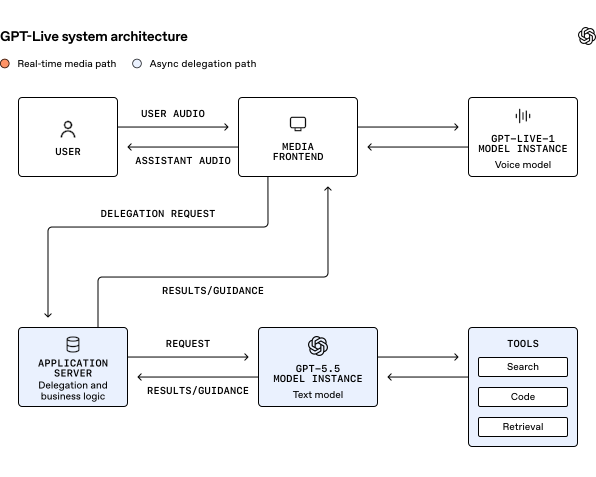
If you are building a voice agent, the practical conclusion is simple. Do not put your database, retrieval stack, tool calls, or long reasoning loop in the audio path. Start with the current Realtime API for the live session, then attach the rest as work that can finish later.
The live path
A conventional voice agent is a relay race. Speech recognition waits for audio, the language model waits for the transcript, and speech synthesis waits for the answer. Even when every component streams, the application still has to decide when a turn ends and how to cancel output when the user interrupts. An independent engineering tutorial measured a fully streaming cascaded stack at 755 milliseconds to first audio, while its non-optimized local end-to-end configuration took about 146 seconds. That is not a small tuning difference. It is the difference between a phone conversation and a batch job.
GPT-Live removes one of those gates by treating the audio exchange as continuous. The model can listen while it talks. It can decide whether to continue, pause, interrupt itself, or call a tool many times per second instead of waiting for a clean user message. This is why full duplex matters. It is not mainly a nicer voice. It changes the state machine your application has to operate.
The live path should therefore be small:
microphone or phone audio
        |
        v
WebRTC or another realtime transport
        |
current realtime voice session
        |
low-latency audio back to the client
Everything that does not have to happen before the next audio frame belongs elsewhere. OpenAI describes GPT-Live's search and reasoning work as an asynchronous path. AG2's current LiveAgent guidance reaches the same design from the framework side: use a realtime session for the conversation, expose a normal text agent as a tool when a task needs deeper reasoning, and return the result to the live session.
This boundary also gives you a useful failure policy. If a tool call is slow, the assistant can acknowledge the request, keep listening, or ask a short follow-up. It should not freeze the microphone because a database query is waiting on a remote service. If the reasoning worker dies, the voice session should report that failure and remain available for a new request. The system feels much better when a delayed answer is delayed content rather than dead air.
The transport details matter more than most model comparisons admit. OpenAI's GPT-Live system uses WebRTC because it is built for live media, packet loss, clock drift, and changing client connections. The company describes a starting point of six network round trips, with WARP reducing startup to one. In the article's shorthand, the startup path is 6 round trips, then 1. That is a measured change in the connection path, not a claim about model intelligence. It is also a reminder that a voice agent can lose its latency budget before the model generates a single token.
There is a second state problem. A voice session can last much longer than a normal request, so context grows while model instances are replaced, compacted, or moved. OpenAI describes warming a replacement instance, prefilling it with the current session context, running both instances in parallel, and switching over when the new one is ready. The same handoff pattern handles context compaction without stopping the media loop. You do not need this machinery on day one, but you do need to avoid designing a session as if it will always be a 30-second demo.
Deployment choice
The current OpenAI developer documentation is the line between what GPT-Live is and what you can deploy. GPT-Live launched in ChatGPT, with an API planned. The current docs direct developers building low-latency voice agents to gpt-realtime-2.1 through a voice-agent session on /v1/realtime. That means the sensible implementation today is not to invent a private GPT-Live client. Build against the documented Realtime interface and keep the audio layer replaceable.
Choose the native realtime route when the product depends on interruption, hands-free use, or the feeling of a live conversation. A field technician, language practice app, phone assistant, or accessibility feature benefits from continuous audio and provider-side turn handling. Use WebRTC for browser and mobile clients that capture and play audio directly. Use WebSockets when your server already receives raw media from a call system or another streaming pipeline. The docs also expose a separate translation session and transcription session, so do not force every audio problem through a voice-agent conversation session.
Choose a cascaded STT, text agent, and TTS pipeline when the text agent must be the source of truth for every step. That is still the better choice for strict structured output, unusual model routing, local control, or a fully self-hosted deployment. A recent enterprise voice tutorial found that optimized native speech models can approach realtime in the cloud while the locally served audio path remains impractical. The same tutorial measured 702 milliseconds to first audio for a hosted realtime configuration and 755 milliseconds for its cascaded streaming pipeline. Those numbers are close enough that architecture, control, and data location may matter more than chasing a theoretical winner.
A workable first deployment looks like this:
1. Create a server endpoint that authenticates the user and issues a short-lived realtime session.
2. Connect the browser or mobile client over WebRTC for microphone input and streamed audio output.
3. Start with gpt-realtime-2.1 and low reasoning effort for the voice session.
4. Register small, fast tools for actions that can return quickly.
5. Send research, retrieval, and long-running actions to a separate worker or text agent.
6. Stream a short acknowledgement while the worker runs, then inject its result into the session.
7. Record live-path latency, interruption latency, tool latency, reconnects, and session duration separately.
8. Test with real accents, background noise, packet loss, long calls, and users who interrupt mid-sentence.
Do not copy the model name blindly. Confirm the current model catalog and API path when you implement, because the ChatGPT product name and a callable API model ID are not the same thing. Put the model identifier behind configuration so a provider change does not require rewriting the transport and session logic.
The testing plan is where most voice prototypes lie to you. A short scripted conversation measures the easy case. OpenAI's own production test routed a gradually increasing share of real sessions to a read-only shadow path while the existing voice system served users. That exposed CPU handlers, queues, geography, reconnects, memory pressure, and shutdown races that a GPU throughput test missed. Measure concurrent sessions, not only requests per second. A voice connection keeps sending frames even when the user is thinking.
Community experience points in the same direction. A Hacker News builder who rebuilt a voice agent without an all-in-one SDK reported roughly 790 milliseconds end to end after colocating telephony, transcription, synthesis, and orchestration. The follow-up warning was less glamorous: barge-in breaks unless you cancel TTS and the language model immediately, and echo can trick voice activity detection into thinking the assistant is the user. Those are not model leaderboard problems. They are media-loop problems.
My recommendation is to build the smallest version that preserves this separation. Use the documented Realtime API for the live surface, keep tools short and observable, send serious work to a separate worker, and treat interruption and reconnect behavior as product features. GPT-Live's interesting contribution is not that voice models became magically human. It is that the system finally admits a conversation has two clocks: the clock of speech and the clock of thought. Your deployment should too.
Sources
- OpenAI GPT-Live engineering article: media path, stateful inference, asynchronous delegation, WARP, and shadow testing
- OpenAI GPT-Live announcement: full-duplex interaction, background delegation, availability, and evaluation context
- OpenAI Realtime and audio documentation: current
gpt-realtime-2.1path, session types, transports, and production guidance - AG2 LiveAgent guide: realtime sessions, tool delegation, and the comparison with STT to agent to TTS pipelines
- Enterprise realtime voice agents tutorial: measured hosted and self-hosted latency, streaming pipeline design, and deployment limits
- Hacker News GPT-Live discussion: community reactions to delegation, interruptions, voice personality, and practical use
- Hacker News voice agent build: hands-on latency and barge-in failure notes from a realtime voice implementation