CodexBar is easy to misunderstand. It looks like a little menu bar meter, but the useful part is less glamorous: it gives you a local place to inspect the limits and usage trails scattered across AI coding tools. The project released version 0.56.1 on August 30, with fixes aimed at exactly the problem most provider dashboards handle badly: historical usage is partial, prices are sometimes missing, and a blank value is not the same thing as zero.
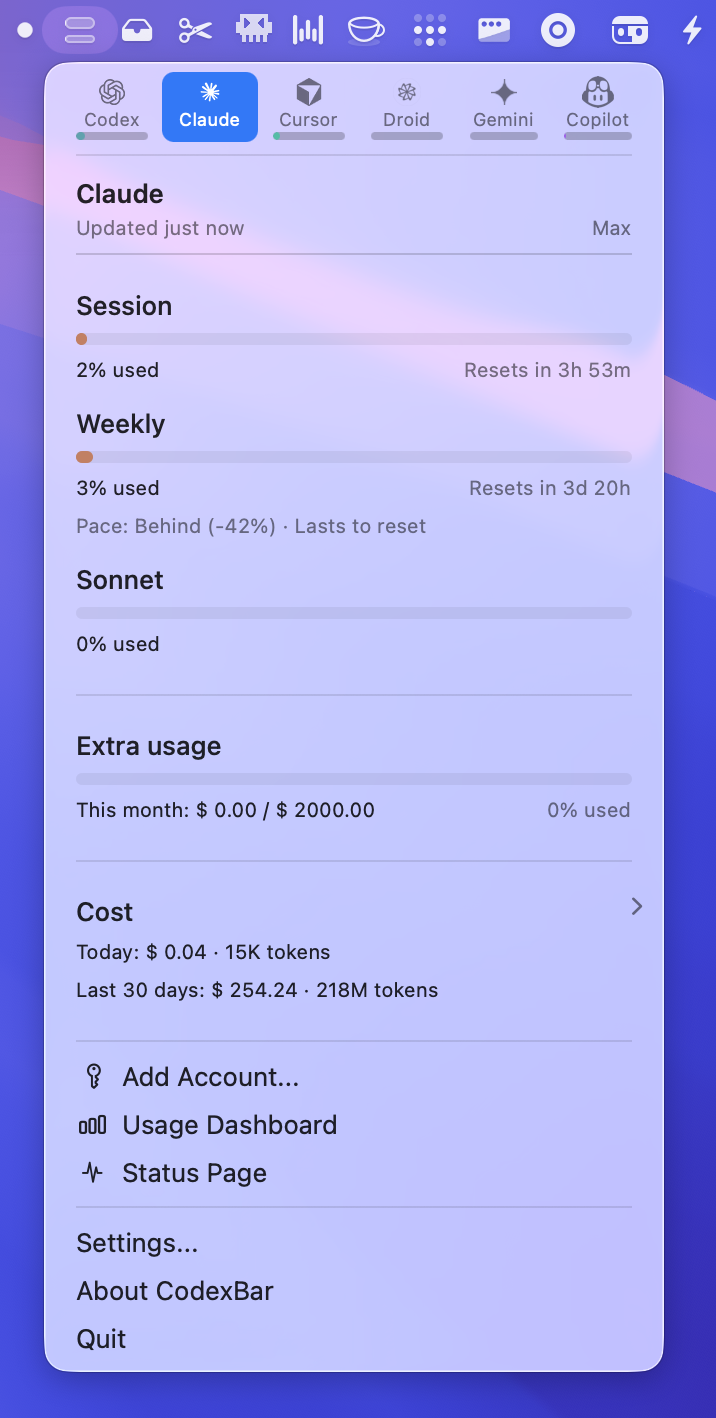
That makes CodexBar worth looking at, but not because it replaces your invoices. It is better thought of as a local audit instrument. Use it to answer questions such as "Can I start a long coding task before this quota resets?" or "Did this week get expensive because of Claude, Codex, or a local history gap?" Then confirm anything that affects a bill in the provider's own account page.
The timing matters. The latest release now loads saved Codex cost totals in one pass per file instead of rescanning history for every day and model. It also preserves the distinction between an unknown price, unavailable history, and zero usage. That sounds like an implementation detail until you have watched a dashboard report $0 because it could not price a session. Treating missing data as free is how small experiments become surprise invoices.
What CodexBar can actually prove
The project README advertises coverage for 69 providers, including Codex, Claude, Cursor, Gemini, Copilot, OpenRouter, LiteLLM, AWS Bedrock, and several other coding and API services. That breadth is useful for one reason: you can put reset windows beside one another instead of opening six browser tabs and trying to remember which one resets in five hours and which one resets next week. It does not mean every provider exposes the same quality of data.
For each provider, the source can be different. CodexBar may reuse an OAuth session, a device flow, an API key, browser cookies, a local file, or a provider CLI. The README says it reuses existing sessions and does not store passwords. That is a sensible default, but it still leaves you responsible for deciding which sources to enable. A browser cookie is more sensitive than a public status endpoint. Do not turn on every provider just because the toggle exists.
The local history side has a hard boundary. Codex history is capped at 25,000 retained session entries and 256 MiB. That is plenty for a personal workstation, yet it is not an accounting ledger. Older sessions can fall outside the retained window, a provider can change its local format, and a source can report tokens without a trustworthy price. The app's honest answer in those cases should be "unknown." Version 0.56.1 improves that behavior by keeping unpriced and unavailable data visible rather than quietly converting it into a reassuring zero.
The distinction between quota and cost is the part I would put in large type. A five-hour request limit is a usage constraint. A local cost estimate is an estimate. An Admin API spend graph or provider invoice is the billing record. Those three numbers can disagree without any of them being broken. CodexBar helps you see the disagreement; it cannot make the provider expose data it never supplied.
This is also where the project differs from a centralized gateway. A gateway can enforce a budget before a request leaves your application. CodexBar mostly observes sessions and provider data on the machine. If your problem is runaway shared API spend, use a gateway-level AI spend control system instead. If your problem is losing track of personal coding subscriptions and reset windows, a local view is much less work.
A safer setup path
Start with the smallest useful installation. On macOS, the project requires macOS 14 or newer and has a Homebrew cask:
brew install --cask codexbar
Linux users can install the CLI through the project's tap or download a release tarball. The README lists glibc and static musl builds for both x86_64 and aarch64. That is a useful split: the graphical menu bar app is macOS-only, while the command line tools can fit into Linux scripts and CI jobs.
After launch, open Settings, then Providers. Enable Codex and Claude only if those are the tools you actually use. Leave browser-cookie sources off until you have a reason to turn them on. For a provider with an API key, the CLI can write the key without putting it directly in a shell history entry:
printf '%s' "$ELEVENLABS_API_KEY" | codexbar config set-api-key --provider elevenlabs --stdin
The resolved configuration normally lives at ~/.config/codexbar/config.json, while older installations may still use ~/.codexbar/config.json. Check the active path before writing automation around it. You can inspect the provider list and toggle sources from the CLI:
codexbar config providers
codexbar config enable --provider grok
codexbar config disable --provider cursor
Then let the app collect a few days of history before drawing conclusions. Look for three labels in your notes: provider-reported quota, local usage, and priced cost. If one of them is missing, keep it missing. Do not fill the gap with a calculated number and later forget that it was your estimate.
The privacy settings deserve the same treatment. The README says CodexBar reads a small set of known locations when related options are enabled. Plain Adaptive refresh does not inspect local agent activity. The separate agent-aware mode asks before reading the running-process list and bounded session metadata. Safari cookie and local-storage imports may require Full Disk Access, while other providers can use a browser, OAuth, a CLI, or a manual key instead. If you do not need a cookie-based source, do not grant the permission just to make a tile turn green.
Where the numbers stop being trustworthy
A good test is to compare one provider in two places. Start a short, known task. Record the provider dashboard value, the CodexBar value, and the time of the last refresh. If the provider shows a charge but CodexBar shows unknown, that is a useful failure. If CodexBar shows a dollar estimate while the provider shows a different metered amount, keep the provider value for billing and use the local number only for trend analysis.
The same rule applies to reset countdowns. A countdown is useful for planning, not a contract. Provider windows can be account-specific, plan-specific, or changed without notice. A stale cached card can also look plausible. Version 0.56.1 fixes several cases where cached provider tabs clipped or stale cost state displaced fresh views, which should reduce confusion, but it cannot remove the underlying dependency on each provider's source.
The practical payoff is modest and real. You stop guessing which subscription is about to throttle you. You can see that an empty history window is empty instead of assuming it was free. You can decide whether to wait for a reset, switch providers, or move a workload behind a budget gateway. That is enough reason to install it. Just do not mistake a tidy local dashboard for an invoice.
Sources
- CodexBar GitHub repository: provider coverage, installation commands, local history limits, configuration, and privacy behavior
- CodexBar v0.56.1 release notes: cost-history performance and unknown-data handling fixes
- CodexBar v0.56.0 release notes: provider history, estimated pricing, and account-boundary changes