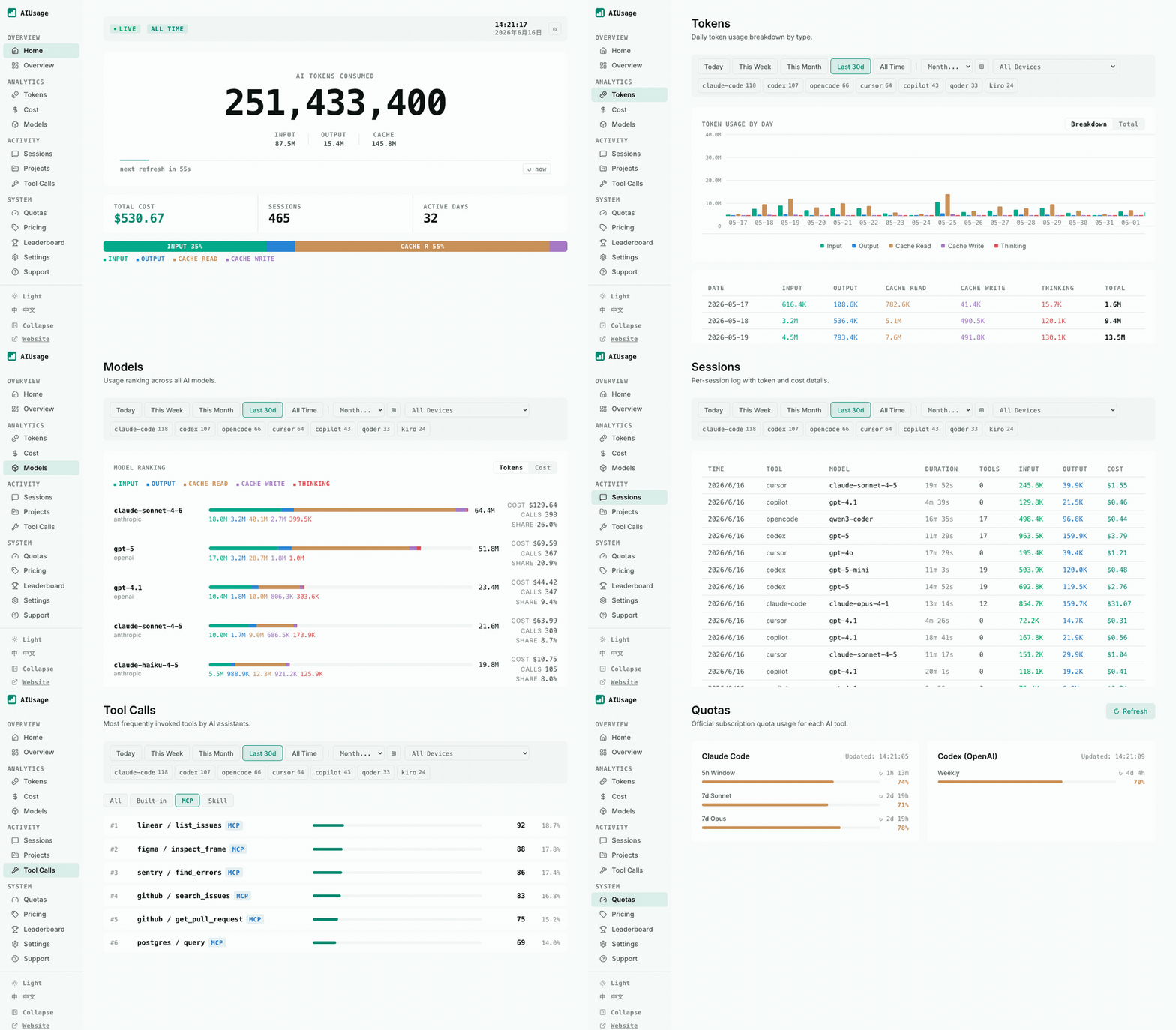
Five dashboards for AI coding usage is a silly way to run a software budget. Claude Code keeps one kind of history, Codex keeps another, Cursor has its own view, and the numbers you care about are split between subscription limits and token estimates. I wanted one local answer to a simple question: which tools, projects, and models are consuming the workday?
AIUsage is a small open source project that tries to answer it by reading the logs and local databases already produced by coding assistants. The useful part is its breadth. The README lists 20+ tools, including Claude Code, Codex, OpenCode, Cursor, Copilot, Gemini CLI, Hermes, and several smaller agents. That makes it a better fit for a mixed-tool developer than a quota widget built around one provider.
There is a catch. AIUsage reports estimated cost, not a bill. Its own documentation says the estimate comes from a pricing table that you can edit, and historical totals depend on the original logs still existing. Treat the dashboard as an instrument panel. Do not use it as accounting software.
Install the local tracker
The cleanest test is deliberately boring. Use a machine where at least one supported coding tool has already created local history. You need Node.js 20+ on the machine, then install the CLI:
npm install -g @juliantanx/aiusage
aiusage serve
Open http://localhost:3847. The default port is 3847, and serve parses the discovered logs once when it starts. You can also run aiusage parse when you want to refresh data without leaving the dashboard process running. aiusage status is the first command to use when the screen is empty. It reports the version, database path, schema, data sources, and record counts, which is much more useful than staring at a blank chart.
The initial screen is not magic. AIUsage checks the normal locations for each tool. Claude Code normally lives under ~/.claude/projects; Codex uses ~/.codex/sessions and its archived sessions; Hermes uses ~/.hermes/state.db. If your logs live somewhere else, configure the corresponding AIUSAGE_*_PATH variable. For example:
AIUSAGE_CODEX_PATH="$HOME/work/codex-sessions" aiusage parse --tool codex
That matters on Docker, WSL, and machines where a tool was launched with a custom home directory. Mounting only ~/.aiusage into a container preserves AIUsage's own database, but it does not give the container access to Claude, Codex, or Cursor history. Mount the source directories too, then point the environment variables at their paths inside the container. Otherwise you have successfully deployed an empty dashboard.
The dashboard groups data by tool, model, project, session, and tool call. The project view is the quickest way to find an expensive repository. The session view gives you a more honest debugging trail: which model ran, how long the session lasted, how many tool calls it made, and what the parser believes the input and output totals were. I would start with those two screens instead of the large total on the home page.
AIUsage also has a terminal summary and exports. aiusage summary --month is handy for a quick monthly check, while aiusage export --format csv --range month -o usage.csv gives you something you can inspect or feed into your own report. Export before changing pricing data if you need a snapshot of what the dashboard showed at that moment.
Lock down the dashboard
The local-first claim is useful, but localhost is not a security boundary if you bind or proxy the service carelessly. The docs say local parsing and the local dashboard do not need an account and do not send telemetry. They also say optional sync and leaderboard features can send data when you turn them on. Those are separate choices. Leave them off until you understand exactly where the data goes.
The dashboard does not require a password by default. Add one before putting it behind a reverse proxy, a tunnel, or a shared workstation:
AIUSAGE_DASHBOARD_PASSWORD='use-a-real-secret' aiusage serve
The password protects the dashboard through a local cookie and is not written into the database, according to the documentation. Do not put a real password in a shell history that other users can read, and do not commit it to a PM2 configuration checked into a repository. If you run the service with PM2, pass the variable when starting it and use pm2 restart aiusage-server --update-env after changing the value.
There is another privacy boundary that is easy to miss. Local parsing does not upload prompts, completions, source code, or file paths. Optional sync is different. GitHub, S3-compatible storage, Cloudflare R2, and MinIO can be configured as sync backends. The project documents a consent fingerprint for the sync target, which is a good sign, but it does not turn remote sync into local-only storage. If the point of this setup is privacy, stop after the local dashboard and disable leaderboard uploads.
The project also supports quota cards for Claude Code, Codex, and GitHub Copilot when local credentials are available. A missing credential leaves a tool in an inactive list. That is better than inventing a quota number, but it means the quota page is not a universal view of every supported tool. Token history and provider quota status are two different data sets. Keep them separate in your mental model.
Decide what to trust
AIUsage is worth installing when you use several assistants and want a single local history. It is especially useful for finding patterns that provider dashboards hide: a repository that quietly consumes most of the month, a model that dominates tool calls, or a run of retries that makes a small task look expensive. The fact that it supports more than 20 tools is the reason to choose it over another single-provider counter.
It is a poor choice if you need invoice-grade spend, team billing, or guaranteed coverage of every tool. Pricing metadata can change. Users can edit it. A provider may charge for something that never appears in a local log, and a cleaned-up session database cannot be reconstructed by AIUsage later. The docs make this explicit: historical totals shrink when the original logs or SQLite records are gone.
That gives you a practical test procedure:
- Run
aiusage statusand confirm that the expected source directories were found. - Run
aiusage parseand compare one known recent session with the source tool's own record. - Open the Projects and Sessions pages and look for missing repositories or obviously duplicated sessions.
- Check the Pricing page before trusting cost totals, then use
aiusage recalconly after confirming the prices. - Export a month of data and keep it beside the provider invoices or receipts you actually use for payment.
If you already use a single-tool tracker, our earlier CodexBar usage-history guide is the more focused option for that workflow. AIUsage wins when the problem is fragmentation, not when you only need one provider's live quota.
One detail I like is that the project does not force the cloud features into the basic install. You can install the npm package, parse local files, and run the browser UI without creating an account. That is the right default for usage data. The moment you enable sync or a public leaderboard, reread the data-handling notes and decide whether aggregate totals are acceptable for that destination.
The broader lesson is less glamorous than AI tooling usually makes it sound. Usage data is only useful when you can connect it to a decision. A monthly token total does not tell you what to change. A project breakdown can tell you which repository needs a cheaper model, a tighter prompt loop, or a hard cap on retries. Install the tracker for that conversation, not for another animated number.
Sources
- AIUsage GitHub repository: supported tools, Node.js 20+ requirement, installation commands, default port 3847, and local-first data handling
- AIUsage official documentation: dashboard password, data sources, cost-estimate caveats, sync options, exports, and CLI reference
- AIUsage security policy: local dashboard, optional upload, and security-report boundaries
- NestFrontier CodexBar guide: a single-provider alternative for local usage history