A weather model can be five times sharper and still be the wrong dependency for your product. WeatherNext 3 is the interesting release this week because it moves AI forecasting closer to the data that weather apps actually need: live satellite observations, hourly refreshes, precipitation estimates, and station-level output. The awkward part is that the useful bits are not all exposed through the same access path, and access itself can take 5–7 business days.
Google's new model is operational, not a downloadable checkpoint. The public WeatherNext repository is still centered on WeatherNext 2, GraphCast, GenCast, and cyclone variants. WeatherNext 3 data is available through Google Cloud Storage, BigQuery, and Earth Engine after an allowlist request. That distinction matters. If you expected to run the newest model on a spare GPU, stop there. The integration target is forecast data, not local inference.
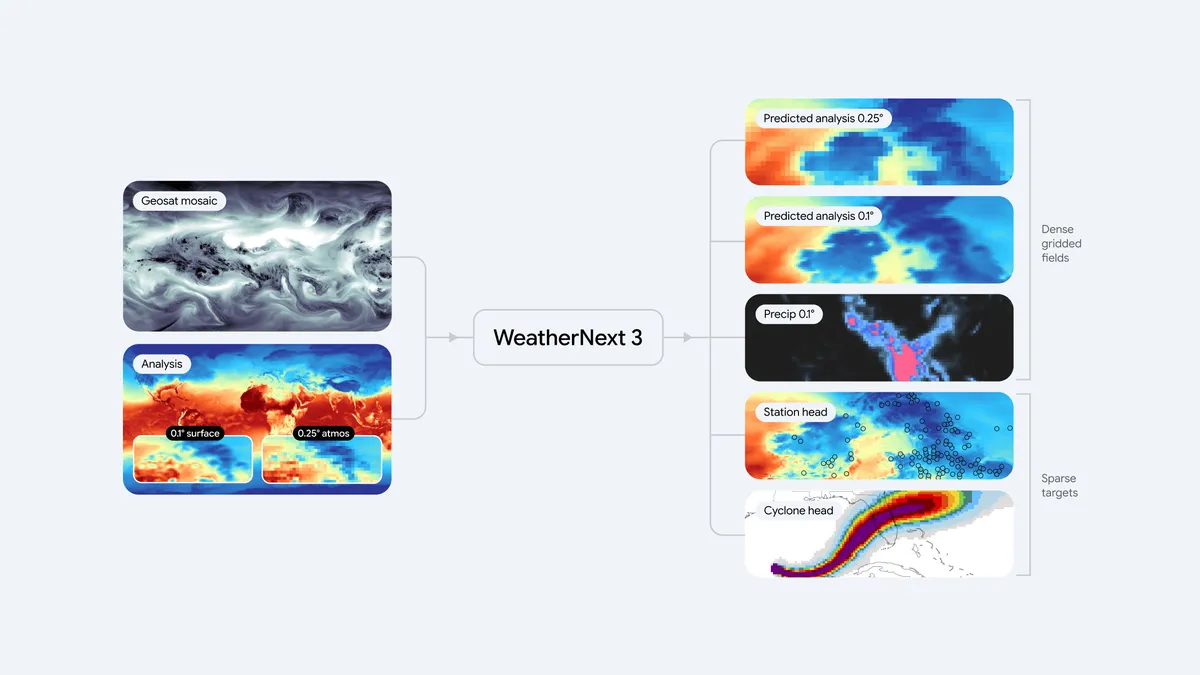
The model itself fixes a stale-input problem. Older global AI systems generally learned from analysis fields produced by numerical weather prediction systems. Those analyses are useful, but the official paper notes that they arrive on a six-hour cycle and can be 6–12 hours behind the atmosphere they describe. WeatherNext 3 feeds low-latency geostationary satellite mosaics directly into a Functional Generative Network mesh transformer. It initializes every hour, while the main synoptic cycles can reach 15 days with 64 ensemble members.
The output is deliberately uneven because weather data is uneven. Station temperature and dewpoint predictions reach 0.05 degrees, about 5 km (0.05° (~5 km) in the model guide). Most gridded surface fields use 0.1 degrees, about 10 km. Pressure-level atmospheric fields remain at 0.25 degrees, about 25 km, and are available only for the six-hourly cycles in the full-ensemble Zarr feed. Calling the entire system a 5 km forecast is technically catchy and operationally incomplete.
The precipitation result is the part worth testing. In the paper's stated evaluations, WeatherNext 3 reports up to a 60% CRPS improvement against IMERG, 30% against MRMS, and 10% against rain-gauge measurements at early lead times. Those are not interchangeable claims. IMERG is a satellite precipitation product, MRMS is a radar-based product, and gauges are point observations. A model can improve against one reference and still be a poor fit for a particular basin, terrain, or decision threshold.
Access decision
If you need point forecasts or a queryable research workflow, request access first and start with BigQuery. It is the least new route for analysts who already work with SQL and need to join forecasts to locations, assets, or historical events. Earth Engine makes more sense when the forecast is part of a geospatial raster workflow. Cloud Storage is the better choice when you need bulk data, the full ensemble, or pressure-level fields in Zarr and can manage object storage and chunked reads yourself.
Do not promise a launch date based on the model announcement. Google's quick-start guide says access requests are typically reviewed within 5–7 business days. Use that interval to build an adapter around your current provider, define a common variable schema, and collect a small replay set. The adapter matters because WeatherNext 3 changed several names from WeatherNext 2. 2m_temperature becomes temperature_2m; wind fields move the height suffix to the end, such as u_component_of_wind_10m.
The first selection rule is simple: choose the surface before choosing the model. BigQuery and Earth Engine expose one-hour surface variables at 0.1 degrees across initialization runs. The six-hour precipitation accumulations and the 13 pressure levels belong to the full-ensemble Google Cloud Storage feed. If your application needs upper-air wind or six-hour accumulated radiation, a BigQuery-only design is a dead end.
The second rule is to match the forecast cycle to the action. The 00, 06, 12, and 18 UTC cycles can run 15 days. The interim hourly runs cover 48 hours. In the compact terms used by the model guide, that is 15 days / 48 hours, depending on the cycle. An hourly refresh does not mean every hourly initialization gives you a 15-day forecast. For a solar dispatch tool, the short refresh may be more useful than the long horizon. For crop planning, the reverse may be true. Write this into the data contract instead of hiding it behind a generic horizon_hours field.
A sensible pilot has three stages. First, compare one location against your incumbent forecast and a trusted observation source. Second, score the exact action you care about, such as missed rain events above a threshold or wind errors at turbine height. Third, replay several forecast vintages so you can see how much the result changes when a new hourly initialization arrives. The headline CRPS number is a reason to run this test, not a substitute for it.
Failure modes in production
The first failure mode is treating a model guide as a severe-weather service. Google's documentation says WeatherNext 3 outputs are provided as-is for information and research, not as official watches or warnings. A logistics dashboard can use it as one input. An emergency workflow must defer to the relevant national meteorological service and local alerts. That is a product boundary, not a footnote.
The second is assuming resolution equals local truth. A 5 km station head uses geographic context and can outperform coarser global baselines at held-out stations, but it does not turn a mountain valley into a dense observation network. Station output and gridded output are different products. Preserve the distinction in storage and in the UI so a user does not read a station-conditioned temperature as a measurement from their exact address.
The third is mixing evaluation targets. The paper reports station, analysis, cyclone, and precipitation evaluations with different ground truths and lead times. Up to 60% against IMERG is not a universal accuracy multiplier. If your business rule is "pause a solar battery when cloud cover crosses a threshold," evaluate that rule. If your rule is "warn a driver about flooding," use official warning products and measure false negatives separately.
The fourth is building a pipeline around data that has not arrived yet. The allowlist queue is part of the deployment plan. Keep the provider interface stable while approval is pending, and make the WeatherNext adapter return explicit states for missing cycles, unavailable variables, and delayed backfills. The official guide says 2024 and 2025 historical data is being backfilled, while 2026 data is available for evaluation. That is enough for a pilot, but it is not a promise that every historical query will be complete on day one.
The fifth is confusing the open-source repository with the new operational model. Google's GitHub project is useful for studying the WeatherNext family and running older checkpoints. Its quick start says the non-Mini models need H100-class VRAM, while Mini models can fit a P100. Those notes help if you want a local research baseline. They do not mean WeatherNext 3 itself can be downloaded and served from that repository.
My recommendation is to request WeatherNext 3 access if your use case benefits from hourly updates, precipitation evaluation, or clean-energy variables, but keep the first release read-only. Start with a small forecast replay, store initialization time and forecast lead separately, and compare decisions rather than marketing scores. If you need official warnings, dense local observations, or a self-hosted model today, WeatherNext 3 is not the answer yet.
Sources
- WeatherNext 3 model guide: resolutions, variables, ensemble size, forecast cycles, and disclaimers
- WeatherNext forecast access guide: allowlist process, platform options, and the typical 5–7 business-day review window
- WeatherNext 3 research paper: raw observation inputs, model design, evaluation targets, and reported precipitation results
- Google's WeatherNext 3 announcement: product integration and system architecture diagram
- WeatherNext open-source repository: available older model code, weights, notebooks, and local hardware notes