A surprising amount of LLM traffic is clerical: classify a ticket, pull fields from a form, rewrite a paragraph, summarize a short note, or turn a known pattern into JSON. Sending every one of those requests to the most capable model is like hiring a senior engineer to rename files. It works. It is also a strange way to run a budget.
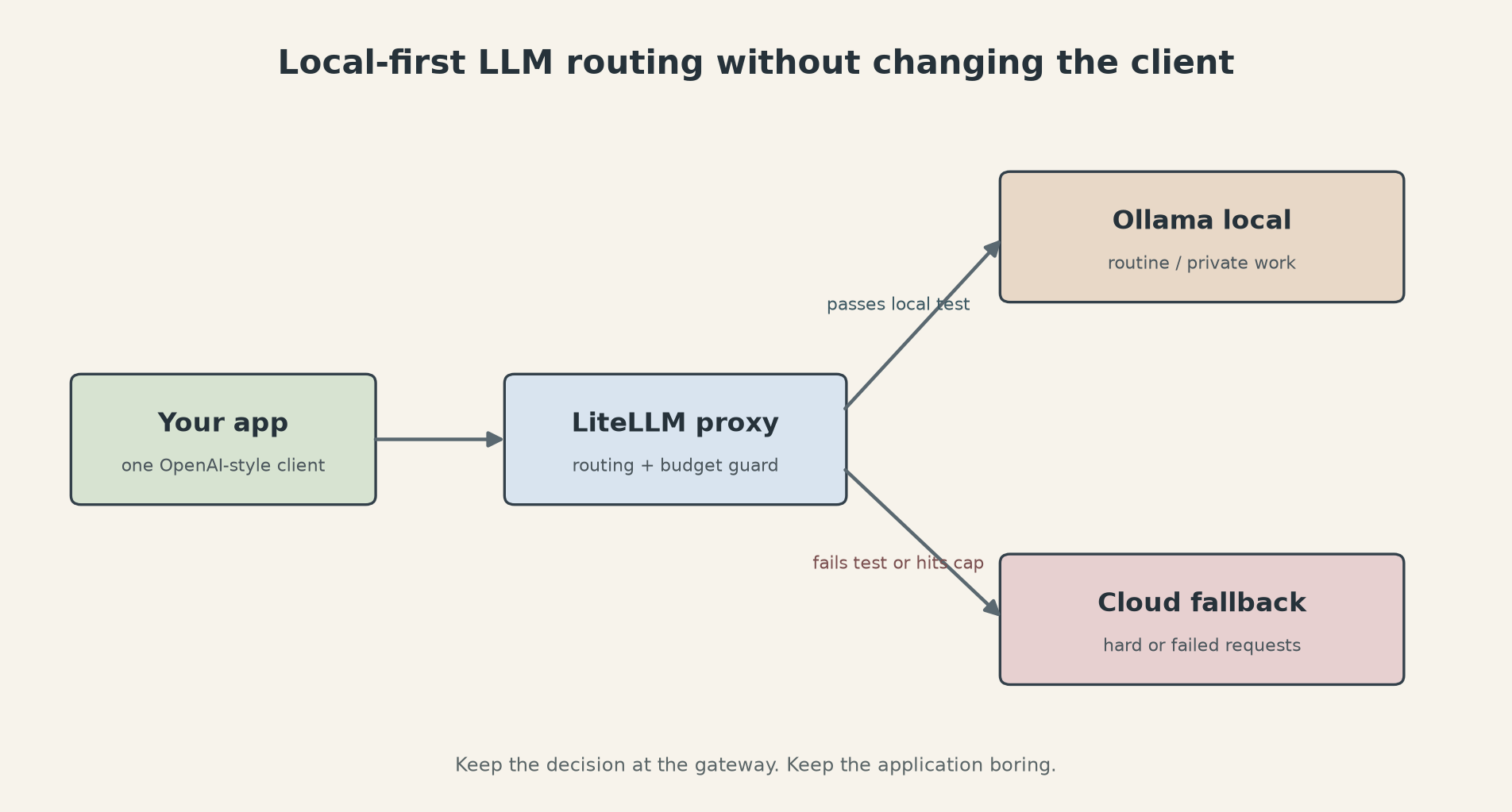
The useful setup is a local first path with a cloud escape hatch. Ollama runs a model on your machine or server. LiteLLM sits in front of it and exposes one endpoint to the rest of your software. Simple jobs stay local. Hard jobs can go to a hosted model, but only when a rule or a quality check says they should. The application does not need a provider-specific client for every destination.
This is not a promise that a small local model can replace a frontier model. It cannot. The point is to stop paying frontier prices for work that never needed frontier capability, while keeping the escape route available for the requests that do.
The routing rule
Start with three buckets, and be strict about what belongs in each one.
Local work has a stable input shape and a cheap failure mode. Examples include language detection, tagging, basic extraction, deduplication hints, short summaries, and first drafts that a human will review. Keep secrets away from any machine that cannot protect them. For ordinary inputs, make the local path the default.
Cloud work needs a long context, a tool call, high-stakes reasoning, or a quality bar that your local model has failed in testing. A contract clause, a production incident summary, or an answer that changes a customer record belongs here until you have evidence that a local model handles it safely. Do not route based on vibes. Define the consequence of a wrong answer first.
The third bucket is escalation. A local response can be too long, fail a JSON parser, miss a required field, or score below a simple evaluator. That is enough to send the same request to the cloud model. The fallback should be explicit, logged, and capped. Quietly escalating everything defeats the point.
Ollama's current API is useful here because it supports the OpenAI client shape. The documented local base URL is http://localhost:11434/v1/, and the API key value is required by the client but ignored by Ollama. The official example uses gpt-oss:20b; you can replace that with a model you have actually pulled. Ollama also documents /v1/chat/completions, tool calls, JSON mode, streaming, and vision support, but compatibility is not the same as identical behavior. Test the features your application depends on.
A small deployment that stays understandable
The official Ollama Docker image exposes port 11434 and keeps models in a named volume. A CPU-only starting point looks like this:
docker run -d \
  -v ollama:/root/.ollama \
  -p 11434:11434 \
  --name ollama \
  ollama/ollama

docker exec -it ollama ollama pull qwen3:8b
Use a GPU flag only after you have confirmed that the host has the right runtime. A Docker command that requests all GPUs does not install a driver or make a GPU visible. Check ollama ps, watch latency, and keep the first test boring. Ask the local model to classify a fixed set of real but redacted examples. Record invalid JSON, refusal, latency, and answer quality. You need a baseline before you can claim that routing saved anything.
Install the LiteLLM proxy with Python 3.10 or newer. The project documents uv tool install 'litellm[proxy]', a proxy port of 4000, and a YAML model_list where the external alias is separate from the provider model string. That separation is what lets the client keep calling local-routine even when you change the local model later.
A minimal configuration is deliberately plain:
model_list:
  - model_name: local-routine
    litellm_params:
      model: ollama/qwen3:8b
      api_base: http://ollama:11434

  - model_name: cloud-review
    litellm_params:
      model: openai/your-cloud-model
      api_key: os.environ/OPENAI_API_KEY

router_settings:
  fallbacks:
    - local-routine: [cloud-review]

general_settings:
  master_key: os.environ/LITELLM_MASTER_KEY
The exact provider model name and API base can vary with your LiteLLM version, so run one request before wiring a production client. Keep the proxy and Ollama on the same private Docker network. Do not publish port 4000 to the internet without authentication, TLS, and a reason.
Your application then points at the proxy instead of a vendor URL. The model alias in the request decides which path to use:
from openai import OpenAI

client = OpenAI(
    base_url='http://localhost:4000/v1',
    api_key='your-proxy-key',
)

result = client.chat.completions.create(
    model='local-routine',
    messages=[{'role': 'user', 'content': 'Classify this support ticket'}],
)
That one indirection is the part worth keeping. If you later replace Ollama with another OpenAI-compatible server, the caller does not change. If a cloud provider changes its SDK, the gateway absorbs the change instead of every service in your stack.
Budget controls are the safety net
A fallback is not a cost policy. LiteLLM's budget routing documentation supports provider budgets, model budgets, tag budgets, and time periods such as 1d and 30d. The proxy tracks spend and removes deployments that have crossed their limit. If every eligible deployment is over budget, the request fails instead of spending silently.
The newer budget fallback feature is separate from ordinary provider failover. LiteLLM documents it as available in v1.92.x and later. A key can have a per-model cap and an ordered fallback chain. Once the primary model crosses its limit, later requests move to the first fallback that still has budget. That is useful for a personal system, but only if the fallback is cheaper or more important than the request you are protecting.
Put the cap on the cloud path, not the local path. A local model has electricity, hardware, and maintenance costs, but it does not create an unknown provider invoice for each request. Give the cloud tier a daily limit that you can tolerate. Then make the limit visible in logs or a /provider/budgets check. A budget that nobody watches is just a comment in YAML.
A safe rollout
Do not turn on automatic escalation for all traffic on day one. Take a fixed evaluation set of at least a few dozen examples for the task you want to route. Include easy cases, long inputs, malformed inputs, and the examples that caused trouble in the past.
Run each example through the local model and record four things: valid output, task accuracy, latency, and whether the answer needs cloud review. For extraction, validate the schema in code. For classification, compare against labeled examples. For summaries, use a human review sample. A model saying something fluent is not an evaluator.
Set a threshold that matches the task. If a missing field causes a support ticket to be misrouted, escalate on missing fields. If the output is a draft that a person edits, latency may matter more than perfect wording. Do not use one global confidence threshold across unrelated jobs. Many local models produce confidence-looking text without calibrated probabilities.
Run the gateway in shadow mode next. Send a copy of selected requests to the local path, but keep the cloud response as the answer. Compare results for a week or for a fixed number of tasks. Measure completed work, not token volume. A local model that uses half the tokens but forces a human to repair every result is not cheaper.
Once the local path passes, route only that task class. Keep an easy rollback: change local-routine back to the cloud alias, restart the proxy if needed, and leave the application untouched. Keep samples of escalated requests. They tell you whether the local model is improving, whether the routing rule is too broad, or whether the task never belonged on a small model.
The honest trade is operational. Local inference adds a machine to patch, a model to update, and a warm-up delay that a hosted API hides. It also gives you a clear privacy boundary and a way to absorb repetitive traffic without sending every sentence to a remote provider. If your volume is tiny, a local setup may cost more in attention than it saves in dollars. If your data cannot leave the machine, the decision is less about price and more about whether you can run the boundary correctly.
Start with one task. Keep one cloud fallback. Add a budget before you add more models. The useful result is not a clever router. It is an application that can change its mind about where a request runs without a rewrite.
Sources
- Ollama Docker image guide: official Docker commands, port 11434, and local model execution
- Ollama OpenAI compatibility: local
/v1/endpoint, client example, and supported request features - Ollama API introduction: official API base URL and request examples
- LiteLLM proxy configuration: model aliases, provider configuration, and proxy startup
- LiteLLM budget routing: provider, model, and tag budgets with time windows such as 1d
- LiteLLM budget fallbacks: v1.92.x behavior for ordered fallback chains
- NestFrontier guide to remote LLM calls: related task-boundary analysis