Cron is easy until the machine running it is asleep, the repository has changed underneath it, or the script quietly depends on a local .env file nobody remembered to copy. Claude Code now gives you three cleaner places to run recurring agent work: cloud Routines, desktop scheduled tasks, and GitHub Actions.
The mistake is treating them as interchangeable schedulers. They are not. The execution boundary decides what Claude can read, which identity it uses to make changes, whether a laptop must stay awake, and how you inspect a failure. Pick the boundary first. Then write the prompt.
Pick the execution mode
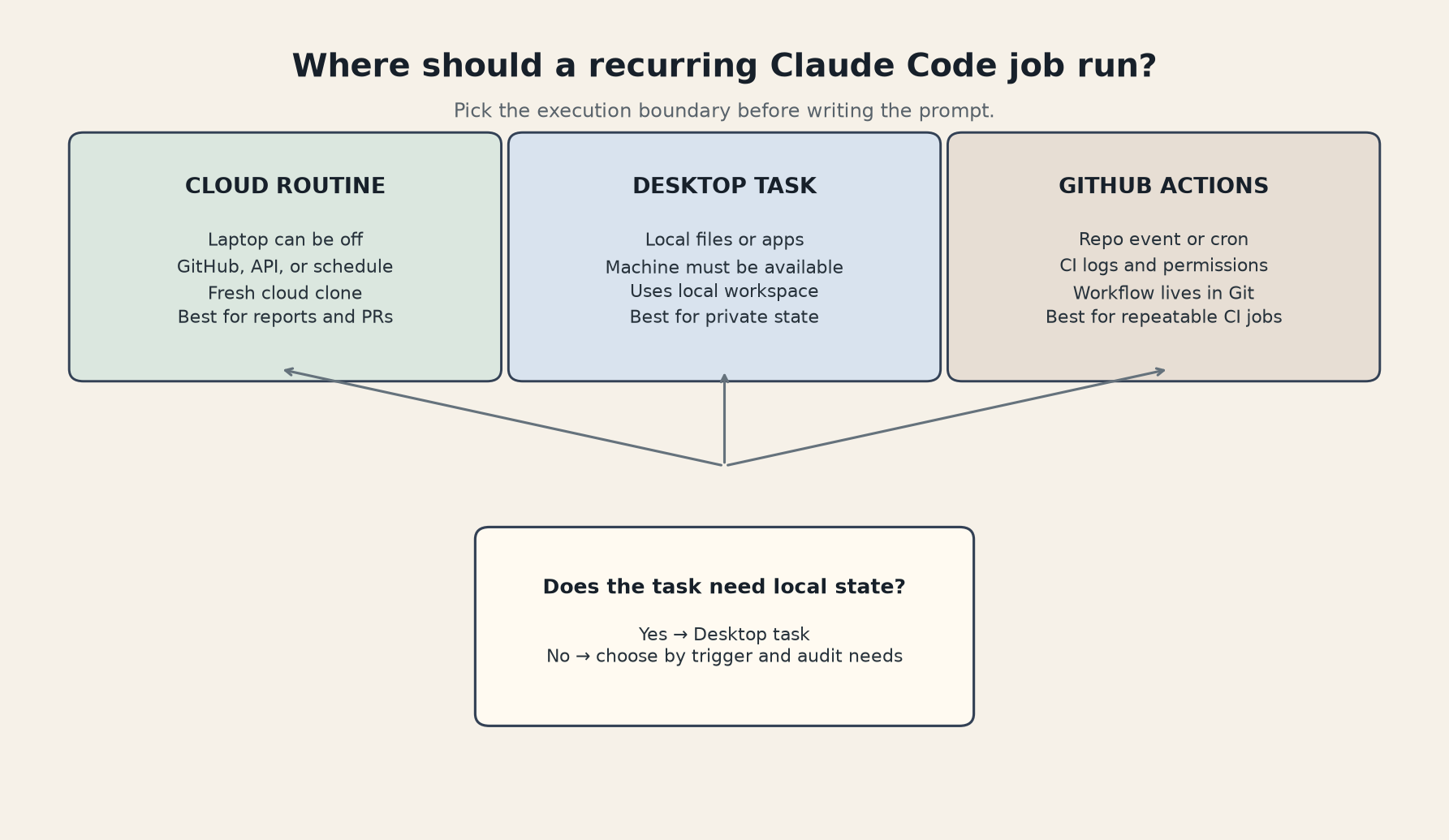
Choose a cloud Routine when the task can start from a GitHub repository and finish with a report, a branch, or a pull request. Anthropic says Routines run on managed cloud infrastructure by default, so the laptop can be closed. They support three trigger types, so the practical count is 3 trigger types: a recurring schedule, an API call, and a GitHub event. A single Routine can combine them, which is useful for a repository review that runs every night but can also be fired after a deployment.
The cloud model has an important detail that is easy to miss: each run starts with a clone of the selected repository. It is not your working directory. Local databases, ignored .env files, uncommitted changes, private network services, and files outside the repository are not magically present. Put required state in a service the Routine can reach, a repository artifact, a connector, or an explicitly configured environment variable. Do not build a workflow that succeeds only because it works on your laptop.
Choose a desktop scheduled task when the job needs local files, local applications, an uncommitted branch, or a service reachable only from your machine. This is the right boundary for tasks such as sorting a local research folder, checking a local development server, or asking Claude to work against a workspace that is not pushed to GitHub. The cost is operational: your machine has to be available, and a sleep state or closed application can stop the run. The decision is simple when the job needs 1 local machine as its source of truth: keep it local.
Choose GitHub Actions when the workflow belongs in the repository itself. Actions are a better fit for pull request events, scheduled CI checks, and jobs where the YAML, permissions, logs, and secrets should be reviewed alongside the code. Anthropic's GitHub Action supports both API keys and Claude Code OAuth tokens, and the workflow can restrict the tools Claude is allowed to call. It is less convenient than a Routine for a personal recurring task, but it is easier for a team to audit and reproduce.
A simple rule gets you most of the way there:
- Local state means desktop task.
- GitHub event plus repository permissions means GitHub Actions or a GitHub-triggered Routine.
- A schedule, API endpoint, or connector with no laptop dependency means cloud Routine.
- A task that can create a PR but should not merge it is a good first candidate for any of the cloud options.
The related n8n lead-scoring workflow uses the same broad idea: let automation prepare a decision, then keep the irreversible write behind a review boundary. Claude's scheduler changes where the agent runs, not the need for that boundary.
The safe setup
Start with a boring job. Weekly documentation drift detection is a better first Routine than autonomous deployment. It has a clear input, a visible output, and a tolerable failure mode. The first version can scan merged pull requests, identify changed APIs, and open a draft documentation pull request. It should not publish directly to production or merge its own code.
A useful prompt is explicit about scope and completion:
Review pull requests merged in the last seven days.

Read the repository's CLAUDE.md and follow its test commands. Identify
README or docs files that describe functions, APIs, configuration, or
commands changed by those pull requests. If documentation is stale, create
one draft branch named claude/docs-drift-review and update only the affected
files. Run the documentation checks. Do not change application code, merge a
pull request, publish a release, or modify secrets.

At the end, report:
- the pull requests inspected
- files that were stale
- files changed
- checks run and their results
- anything that needs a human decision
Create it at claude.ai/code/routines or use /schedule from Claude Code. Select the repository, choose a cloud environment, and add only the connectors the task needs. Anthropic notes that connectors included in a Routine can expose their available tools, including write operations, without a permission prompt during the run. That is a reason to remove unused connectors, not a reason to add every integration up front.
Treat the environment as part of the program. Configure network access deliberately. Add a setup script for dependencies rather than assuming the base image matches your workstation. Store secrets in the environment or the platform's secret mechanism, never in the prompt and never in a committed file. Remember that environment variables can be visible to anyone who uses that environment, so a shared environment needs the same care as a shared CI runner.
The CLI support also has version edges. The official Routines documentation says the CLI path for adding a GitHub trigger requires Claude Code v2.1.225 or later. If /schedule is missing or a GitHub trigger cannot be added, check the installed version and account login before rewriting the workflow. Routines use a Claude.ai account flow; an API-only login is not enough to create them from the CLI.
Test with “Run now” before trusting the schedule. Use a read-only prompt first. Confirm that the clone contains the expected branch, that the setup script installs what the task needs, and that the output is visible where you expect it. Then add one write action, preferably a draft pull request or a message to a private channel.
Where each option breaks
Routines are still a research preview. Anthropic warns that behavior, limits, and the API surface may change. They are also account-level automation. The official documentation says routines belong to an individual Claude.ai account, are not shared with teammates, and count against the account's daily run allowance. That makes them convenient for personal maintenance and less attractive as the only control plane for a team-critical process.
Cloud execution also removes the approval pause that makes interactive Claude Code feel safer. A Routine runs as a full session without a permission-mode picker or mid-run approval prompts. Scope the repository, connectors, environment, and tools before the trigger fires. If a task can send messages, open tickets, or alter code, make the expected output a draft and require a human to approve the next step.
Desktop tasks fail in the opposite direction. They preserve local access, but they inherit local fragility. A sleeping laptop, closed app, changed folder path, expired login, or VPN outage can break the run. They are excellent for private workspaces and awkward as a team service. If other people need to know whether the job ran, you will need to add your own reporting.
GitHub Actions give you the strongest repository audit trail, but they require you to think like a CI maintainer. Secrets need correct permissions. The workflow needs a timeout and a cost ceiling. A scheduled workflow can overlap with a previous run unless you guard against concurrency. Claude's action can read and write issues or pull requests depending on the permissions you grant, so start with read-only permissions and add writes one at a time.
The practical decision is less about which product feels smartest and more about where the inputs and authority already live. A private local database belongs near the desktop. A pull request review belongs near GitHub. A nightly report based on repository files and connected services fits a cloud Routine. For anything that can damage production, use the least powerful boundary that still completes the job, produce a reviewable artifact, and keep the final write with a human.
Claude Code Routines are useful because they remove the laptop from the schedule. They do not remove the need to design the workflow. The best first automation is small, stateless, observable, and easy to undo. Once that works, the next job is a choice.
Sources
- Claude Code Routines documentation: official reference for cloud execution, repository cloning, environments, triggers, limits, and setup.
- Claude Code common workflows: official comparison of Routines, desktop scheduled tasks, GitHub Actions, and
/loop. - Claude Code GitHub Actions: official action setup, authentication, permissions, scheduled workflow, and cost controls.
- Claude Cowork scheduled tasks: official local-file limitation and recurring-task behavior.
- Claude Routines practical guide: independent field guide covering fresh clones, usage caps, and low-risk starter jobs.