A local LLM server can feel perfect right up until two people use it at the same time. The model is loaded. The API works. The first request is fast. Then a long answer arrives, a second request waits behind it, and somebody decides the model is "slow" when the real problem is the serving layer.
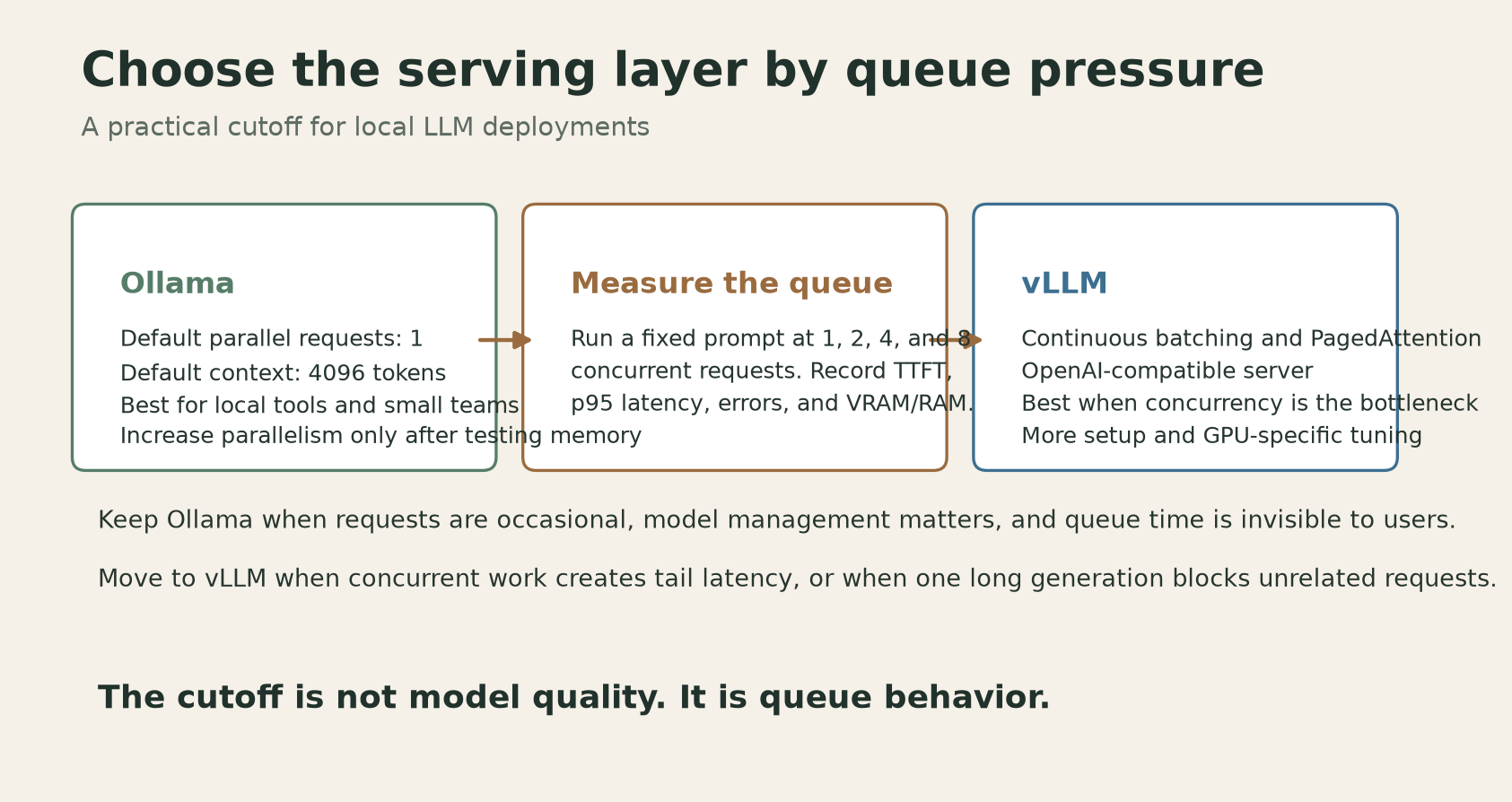
The useful question is not whether Ollama or vLLM is the better project. They solve different jobs. Ollama is the low-friction local runner. vLLM is the concurrency-oriented server. Pick based on what your queue looks like, not on a leaderboard or a vague promise of production readiness.
When Ollama is enough
Ollama is the sensible choice when one person, one agent, or a small internal tool sends requests occasionally. Its setup is hard to beat: install one binary, pull a model, call a local HTTP endpoint, and get on with the actual application. It also keeps model downloads and basic serving in one place, which matters when the alternative is building a small platform team around a prototype.
The defaults tell you what Ollama optimizes for. Its current FAQ documents a default context window of 4096 tokens and a default of 1 parallel request per model. That does not mean Ollama can never serve concurrent work. It means concurrency is a memory decision you have to make explicitly. Ollama says required memory scales with OLLAMA_NUM_PARALLEL multiplied by OLLAMA_CONTEXT_LENGTH. Four parallel requests at an 8K context budget are not a free switch. They reserve room for a much larger active context than one request at 4K.
If your workload is a nightly document job, a personal coding assistant, or an API with a few requests per minute, leave the default alone. You get simpler failure behavior, fewer GPU surprises, and less time spent tuning a server that is not your product.
The first useful tuning step is not raising the parallel limit. It is checking what is already happening:
ollama ps
Then send a fixed prompt repeatedly and watch memory while you test. Keep the model, prompt, output limit, and context setting fixed. Change one variable at a time. A test that changes the model and concurrency together tells you almost nothing.
Ollama also exposes a queue ceiling. Its FAQ documents OLLAMA_MAX_QUEUE with a default of 512 queued requests. That is a capacity limit, not a latency guarantee. A request waiting in a large queue is technically accepted and practically broken if the user has already closed the page.
The migration test
Do not migrate because a blog says vLLM is faster. Migrate when your own queue makes the decision obvious. Use a short load test with the same prompt and model at one, two, four, and eight concurrent requests. Record four things: time to first token, p95 completion latency, error count, and memory use. A single-user tokens-per-second number hides the problem you are trying to measure.
Here is a small test plan that works for an internal service:
- Warm the model before measuring. Cold model loading is a different problem.
- Use a fixed input and a fixed maximum output, such as 256 generated tokens.
- Run each concurrency level more than once and discard the first run.
- Compare p95, not just the fastest request.
- Stop increasing parallelism when memory pressure causes CPU offload, swapping, or timeouts.
Keep Ollama if the p95 curve stays inside your user-facing budget at the highest realistic concurrency. For a private assistant, that budget might be 30 seconds. For autocomplete, it might be 2 seconds. There is no universal cutoff, and anyone giving you one without asking about the workload is selling a benchmark.
Move to vLLM when the queue, rather than token generation, dominates the wait. vLLM's current documentation lists PagedAttention and continuous batching among its serving features. In plain language, new requests can share the engine while other requests are still generating instead of waiting for a whole batch-shaped turn to finish. That is the important difference when several agents or users arrive together.
A published 2026 study comparing the two systems under concurrent workloads found the same pattern: vLLM stayed stable at up to 100 concurrent users in the tested setup, while Ollama hit a bottleneck near 10 users and showed first-token delays of 54 to 122 seconds under heavier loads. Those figures are not a promise for your GPU. The hardware, model, quantization, prompt lengths, and server versions differ. They are useful because they measure the failure mode that single-request benchmarks miss.
The migration itself is less dramatic than the engine names suggest. vLLM provides an OpenAI-compatible server. The current quickstart uses:
vllm serve Qwen/Qwen2.5-1.5B-Instruct
It listens on port 8000 by default and exposes the familiar /v1 endpoints. If your client already supports an OpenAI-style base URL, the cutover is usually a configuration change rather than a rewrite:
from openai import OpenAI

client = OpenAI(
    api_key="local-token",
    base_url="http://localhost:8000/v1",
)
That convenience has a catch. The model format, GPU support, chat template, and memory budget still matter. vLLM is not a magic compatibility layer for every model file you have in an Ollama directory. Treat the migration as a parallel deployment: keep Ollama serving the old endpoint, start vLLM on another port, run the same prompts against both, and switch the client only after responses, tool calls, streaming, and error handling match.
The safest rollout has three gates. First, start vLLM with an API key if the endpoint is reachable beyond localhost. Second, put a reverse proxy or private network boundary in front of it. Third, keep the old server available until you have tested a restart, a model-load failure, a request timeout, and a full queue. vLLM's own security documentation warns that API-key checks apply to the API routes, not automatically to every sensitive endpoint on the same server. Do not expose the raw process to the public internet and assume one flag solved authentication.
There is also a third option that gets ignored in these debates: keep Ollama for interactive work and run vLLM for the shared endpoint. The model does not need to be identical. A laptop can use a convenient local runner while a small GPU server handles batch jobs, agent swarms, or team traffic. The split often costs less engineering time than forcing one runtime to serve every workload.
Our earlier guide on local first model routing covers the model-selection side of this decision. This article is about what happens after you choose the model and more than one request wants it.
The clean rule is simple. Start with Ollama. Measure the queue. Raise parallelism only if the memory math and p95 latency still work. Switch to vLLM when concurrent requests are the bottleneck, not because "production" sounds more serious. A server should earn its complexity by removing a failure you can actually observe.
Sources
- Ollama FAQ: documented defaults for context length, parallel requests, queue capacity, model memory, and network exposure
- vLLM stable documentation: PagedAttention, continuous batching, supported serving features, and project scope
- vLLM quickstart: installation,
vllm serve, default port, and OpenAI-compatible client examples - vLLM security documentation: limits of API-key authentication on the HTTP server
- vLLM OpenAI-compatible server: HTTP serving interface and compatible API routes
- Concurrent LLM serving study: measured concurrency, latency, throughput, and error-rate comparison