The first automation bill is rarely the subscription. It is the Saturday you spend wiring credentials, the two hours you lose when an API changes, and the half-finished runs you quietly repair by hand.
That is why "free" automation can be more expensive than a $20 plan. If a workflow saves three hours a month but needs four hours of maintenance, it is not saving time. It is a hobby with a webhook.
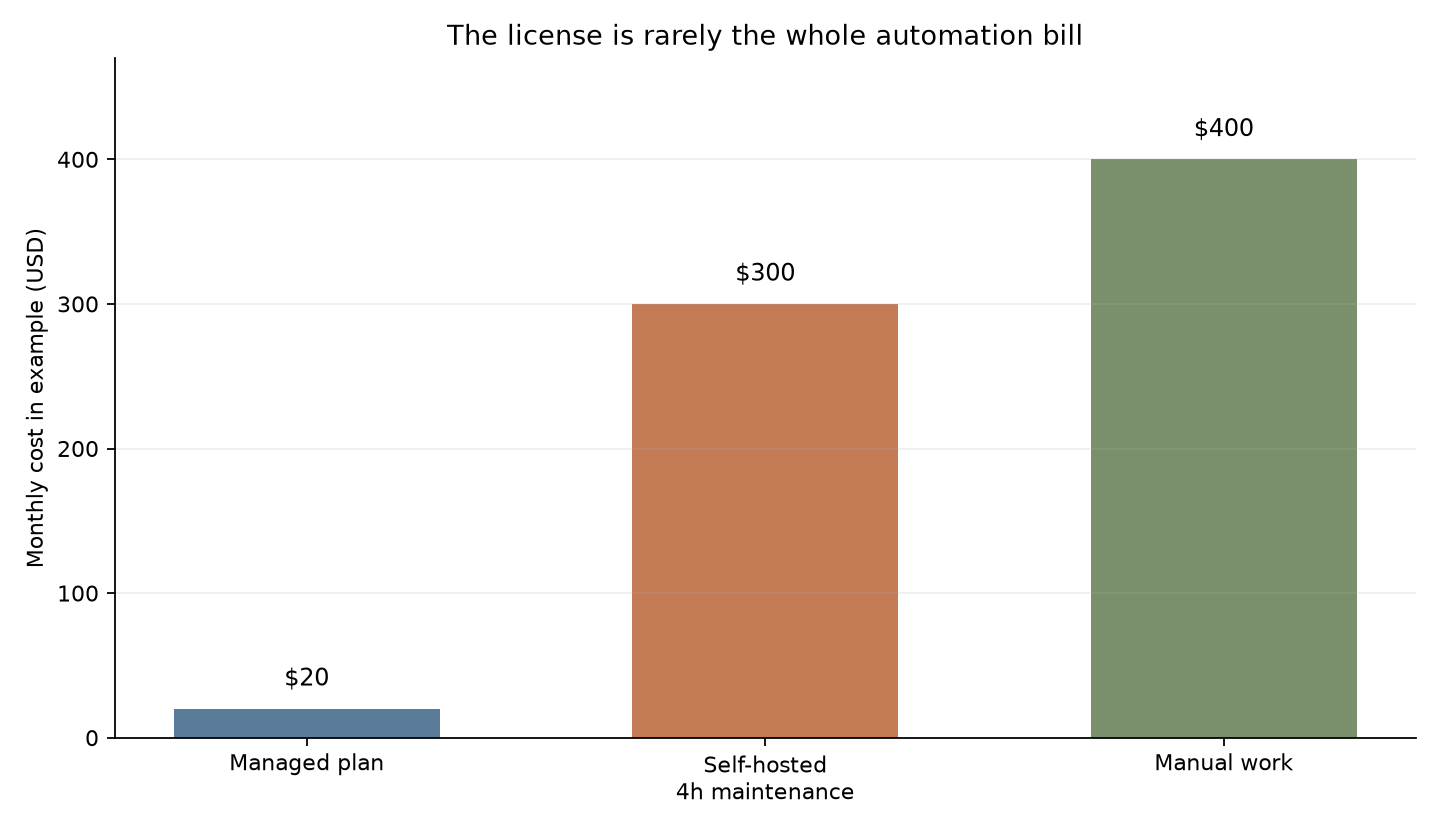
The useful question is not which AI automation tool has the lowest sticker price. It is whether the whole loop produces more value than it consumes. This guide gives you a small model for answering that before you buy a platform, rent a server, or spend a weekend building an agent that sends three emails.
The break-even formula
Start with the value of the work you are removing. Pick a defensible hourly rate. It can be your salary divided by working hours, your freelance rate, or the rate you would pay someone else to do the task. Do not use a fantasy value because it makes every automation look brilliant.
Then write down the monthly cost of the old process:
manual value = hours spent per month × hourly value
Now price the automated version:
automation cost = tool + model + hosting + maintenance + failure rework + setup amortization
The automation pays off only when:
manual value - automation cost > 0
For a payback target, use:
months to pay back = one-time setup cost ÷ monthly net savings
Here is a deliberately ordinary example. A founder spends 10 hours each month cleaning inbound leads and values that time at $50 per hour. The manual process is worth $500 per month. A workflow takes 12 hours to build, needs two hours of maintenance monthly, costs $20 for its automation plan, and uses $15 of model calls. If the founder values maintenance time at the same $50 rate, the monthly automated cost is $135 before setup amortization: $100 for maintenance, $20 for the plan, and $15 for model usage.
The monthly saving is $365. The 12-hour setup costs $600 at the same rate, so payback arrives in 1.64 months. That is a good candidate. If the workflow saves only four hours, the manual value is $200 and the automated version loses $65 every month. The free option is still a bad deal.
The model gets more honest when you add a failure reserve. Multiply the monthly runs that fail by the minutes needed to repair each one. Ten failed runs at 12 minutes each is two hours. Add that to maintenance. If you do not, you are calling your own debugging unpaid labor.
A spreadsheet is enough. Give every candidate workflow one row with these columns: monthly runs, minutes per manual run, hourly value, setup hours, maintenance hours, platform fee, model spend, hosting, failed runs, repair minutes, and payback months. Keep the inputs visible. A black-box ROI calculator is just a sales page with decimals.
Where the cheap option loses
Self-hosting often wins on license price and loses on attention. n8n's documentation says the Community edition can be self-hosted for free with almost the complete feature set. That is a real option, especially if you already operate a server and know how to patch it. It is not the same as zero cost.
The hosted n8n plans show the shape of the tradeoff. The Starter plan is listed at 20 euros per month billed annually with 2,500 executions, while Pro is 50 euros with 10,000 executions. n8n counts a complete workflow run as one execution regardless of how many steps it contains. That is easier to forecast than per-step billing, but you still need to price the person who watches the instance.
The page also lists a Business plan at 667 euros per month billed annually with 40,000 executions. That is not a sensible starting point for a solo operator. It is a useful warning, though: the platform tier can become the dominant line item long before model tokens do.
Make has a different meter. Its free plan allows up to 1,000 credits/mo, and each module action, such as adding a row or fetching email, counts as one credit. A five-step scenario that runs 200 times does not cost 200 credits. It costs roughly 1,000 before retries and branches. That is why comparing "number of workflows" across platforms is meaningless. Compare the unit they meter.
The decision rule is simple:
- Choose a managed plan when your maintenance time costs more than the subscription premium.
- Choose self-hosting when you already have reliable infrastructure and the workflow volume is high enough to spread maintenance across many runs.
- Keep the task manual when its monthly value does not cover setup plus recurring cost inside your payback window.
- Use a simpler deterministic script when the workflow does not need a model to decide anything.
That last option is the one most AI workflow articles skip. If the job is "copy a row, rename a file, and call an API," adding an agent adds failure modes without adding judgment. Use an LLM where ambiguity is the bottleneck, not where a cron job would do.
Cut model spend after the workflow earns its place
Model spend is often the easiest cost to reduce, but it should be the second move, not the first. First prove that the task has enough value. Then route work according to urgency and difficulty.
OpenAI's Batch API offers 50% lower costs, a separate rate-limit pool, and a 24-hour completion window. Anthropic's Message Batches API also charges 50% of standard API prices. Those numbers are useful only for work that can wait. Lead scoring before a sales call is not a batch job. Overnight document classification probably is.
Both providers expose the same operational catch in different words: batch work is asynchronous. OpenAI says a batch can expire if it does not finish inside the 24-hour window, and unfinished requests are cancelled. Anthropic reports results as succeeded, errored, canceled, or expired. Your cost sheet needs a retry and review path, not just the discounted token rate.
A practical routing setup has three lanes. Real-time requests use the normal API and a small model when the task is routine. Non-urgent bulk work goes through batch processing. Ambiguous or high-impact cases go to a stronger model or a human review queue. The router itself can be ordinary code. You do not need an agent to choose between a timestamp and a deadline.
This is also where prompt caching and context limits matter. A workflow that sends the same 30,000-token instruction block on every run can look cheap at 100 runs and become the largest bill at 10,000. Measure input and output tokens separately. Log retries. Record the model name. If your cost sheet has only a monthly API total, it cannot tell you what to fix.
For a deeper example of moving non-urgent work into discounted APIs, see batching AI work. If you already run agents that poll for status, cheap polling loops show how to avoid paying a model to sit idle.
A five-minute decision test
Before building, run the task manually for a week. Count the real minutes, not the time you hoped it took. Write down every exception. If the process changes every day, automation will inherit that instability and make it harder to see.
Next, make a tiny version that handles one narrow path. Do not start with a general agent. A lead workflow might only classify messages with a known form, write a label, and put uncertain cases in a review queue. That boundary gives you a measurable success rate.
After ten or twenty real runs, recalculate the row. Include the time spent checking output. If the system saves 90 minutes but reviewing it takes 80, the useful saving is 10 minutes. If it fails twice a month and each failure takes an hour to understand, add two hours. The goal is not a perfect forecast. It is to stop lying to yourself about free labor.
Set a kill rule before you ship. For example: keep the automation only if it saves at least five net hours per month, reaches payback within three months, and keeps repair work below one hour per month after the first month. Change those thresholds for your situation, but write them down. Otherwise every broken workflow becomes a permanent monument to the hours you already spent.
The best automation is usually boring. It removes a stable loop, exposes its errors, and has a clear owner. The model can be clever inside that box, but the economics should remain simple enough to explain on a napkin.
Sources
- OpenAI Batch API documentation: 50% lower costs, 24-hour completion window, rate limits, and expiration behavior
- Anthropic Message Batches documentation: 50% pricing, asynchronous processing, and result states
- n8n pricing: hosted plan prices, execution allowances, and the Community edition option
- n8n hosting choices: cloud versus self-hosted tradeoffs and free Community edition details
- Make pricing: credit-based billing and the 1,000-credit free plan
- Community break-even discussion: setup hours, maintenance, hourly value, and payback framing