If you want a local model to do more than chat, the important code is not the tool schema. It is the small dispatcher between the model and your machine. Ollama can return a request to call a Python function; your program decides whether that request is allowed, runs it, and sends the result back. Leave out that boundary and a “local agent” is just a model asking your process to do things.
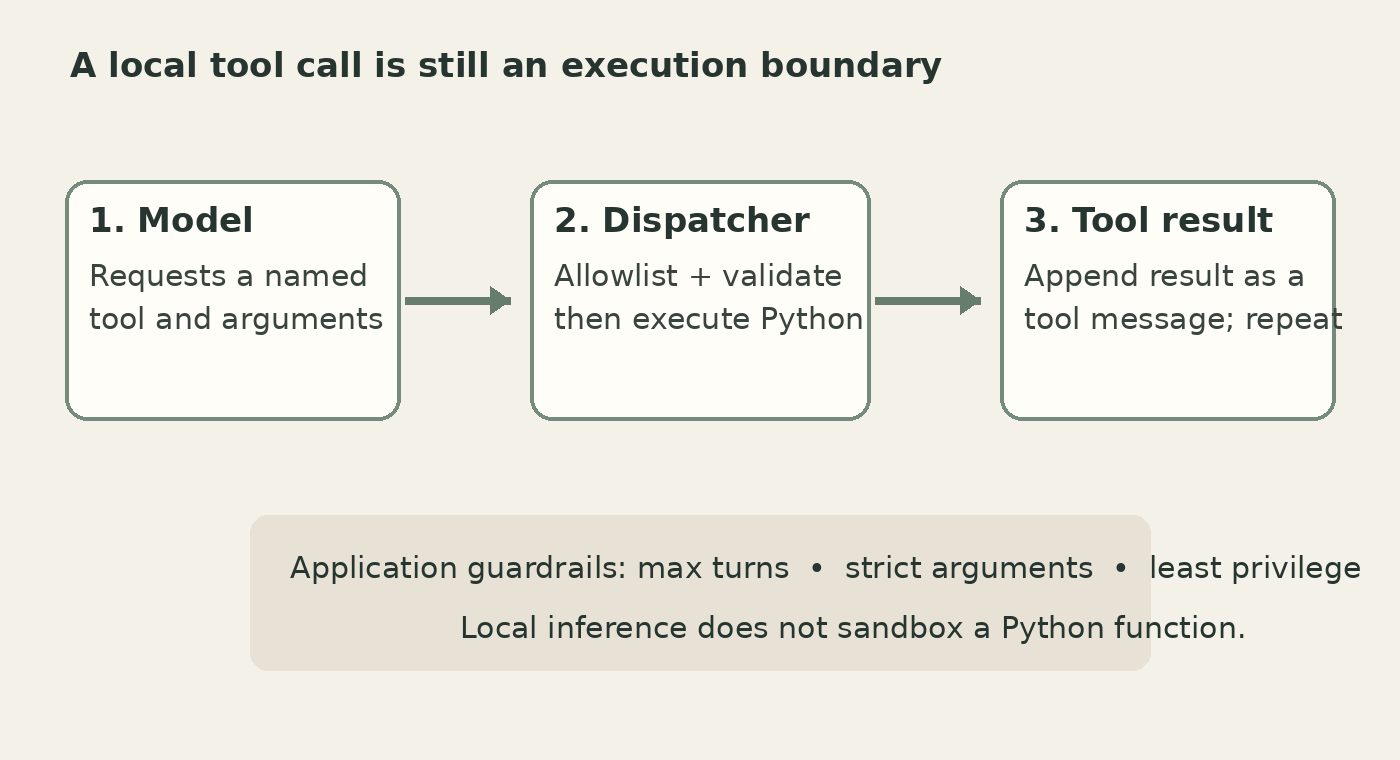
This is useful for a private document lookup, a local note search, or a read-only status check. It is a poor starting point for deleting files, sending email, or changing production records. Local inference keeps the prompt and model call on your machine, but any function you expose still runs with your program's permissions.
A bounded Ollama tool loop
Install Ollama, pull a model that supports tools, and install its Python SDK with pip install ollama. The model name below is qwen3, matching the current Ollama tool-calling guide. The function is deliberately boring: it searches a tiny in-memory notebook, so you can see the request/response flow without giving the model shell access or arbitrary filesystem access.
from ollama import chat

NOTES = {
    "deploy": "Keep a rollback command beside every production deploy.",
    "backup": "Restore tests matter more than a green backup job.",
    "agent": "Cap tool rounds and validate every argument in Python.",
}

def search_notes(query: str) -> str:
    """Search the local demo notes for a short keyword."""
    if not isinstance(query, str) or not query.strip() or len(query) > 40:
        return "Rejected: query must be 1 to 40 characters."
    matches = [text for key, text in NOTES.items() if query.casefold() in key]
    return "\n".join(matches) if matches else "No matching note."

TOOLS = {"search_notes": search_notes}
messages = [
    {"role": "system", "content": "Use search_notes for local notes. Do not invent its results."},
    {"role": "user", "content": "What do my notes say about agent safety?"},
]

for _ in range(4):
    response = chat(model="qwen3", messages=messages, tools=list(TOOLS.values()))
    message = response.message
    calls = message.tool_calls or []
    if not calls:
        print(message.content)
        break

    # Preserve the assistant message that contains the requested calls.
    messages.append(message)
    for call in calls:
        name = call.function.name
        function = TOOLS.get(name)  # never eval() a model-supplied function name
        if function is None:
            result = "Rejected: tool is not on the allowlist."
        elif name == "search_notes":
            args = call.function.arguments
            if set(args) != {"query"}:
                result = "Rejected: unexpected arguments."
            else:
                result = function(**args)
        else:
            result = "Rejected: tool is not enabled."
        messages.append({"role": "tool", "tool_name": name, "content": str(result)})
else:
    print("Stopped: four tool rounds reached. Review the transcript before continuing.")
The loop’s shape follows Ollama’s documented message sequence: send a request with tools, retain the assistant response that contains tool_calls, execute each permitted function, append each result with role tool, then ask the model again. The official single-shot example returns 1 tool call, then appends its result before a follow-up request. That is the smallest useful test. A real agent repeats the same operation until it returns normal text or the application stops it.
The TOOLS dictionary is an allowlist. The model can suggest a function name, but it cannot turn a string into executable Python. The argument check is separate because a JSON schema helps the model format a call; it does not prove the values are safe. In this example, the query has a length limit and the function can only inspect fixed demo notes. If you replace it with a database query, use parameterized SQL and a read-only database account. If you replace it with file search, resolve paths under one approved directory and reject traversal outside it.
One subtlety: the SDK documentation notes that returned arguments may not match the declared schema exactly. Its arithmetic example casts values before using them. Do the equivalent validation for your own types, ranges, and identifiers. Do not assume that a Python annotation or tool description is a security control.
Where to put the safety boundary
Keep permissions in the function implementation, not in the prompt. A prompt can tell the model to avoid a dangerous action; it cannot stop a bug, a malformed argument, or an adversarial document to trigger your own code. Start with read-only functions. For a write, make the tool return a proposed change first, then require a person to approve the exact target and payload in a separate step.
The four-round cap is also application policy, not an Ollama setting. It bounds how many times this process will hand control back to the model. When the cap is reached, the example stops and asks for review instead of silently pretending the task succeeded. For unattended jobs, log the request, selected tool, validated arguments, result status, and stop reason. Avoid logging secrets or full private documents by default.
Test the boundaries before connecting real data. Try an unknown tool name, an extra argument, an empty query, and a prompt that asks for several searches. Confirm the unknown name and unexpected arguments never reach a function. Then test a tool exception and make sure it becomes a visible failure, not a fabricated success. Finally run a request that needs more than four rounds and verify that the cap stops it.
This workflow does not make a small local model reliable at tool selection. Ollama’s tool support is model-dependent, and weak models can skip a tool or return awkward arguments. Keep the test task narrow, inspect the actual returned tool call, and treat “the model said it used the tool” as no evidence at all. The evidence is the function call your dispatcher accepted and the result your code actually returned.
For hardware planning, first check whether your GPU can fit the model. If you later expose write-capable actions, gate risky agent actions before execution. Those are separate problems: fitting a model does not make its tools safe.
The practical win is a local, inspectable workflow with one narrowly scoped capability. Keep the tool boring, the permissions small, and the stop condition outside the model. That is a much better first agent than handing a chatbot your terminal and hoping it behaves.
Sources
- Ollama tool calling guide: single-tool, multi-turn, and parallel tool examples; documents the one-result round trip used here.
- Ollama chat API reference: request fields and response structure, including tool calls.
- Ollama Python SDK tool example: function dispatch, preserving the assistant call message, and returning tool results.