If an n8n workflow works with 20 records and collapses at 2,000, the problem is usually not the API call. It is the shape of the traffic. n8n is happy to pass a long list downstream, and many nodes process items automatically. Your API may interpret that list as a burst of requests.
The fix is simple, but the settings are easy to get wrong: put a Loop Over Items node before the expensive call, choose a batch size from the API's actual limit, add a Wait node when the limit is time based, and make retries narrow enough that a temporary 429 does not become a duplicate operation.
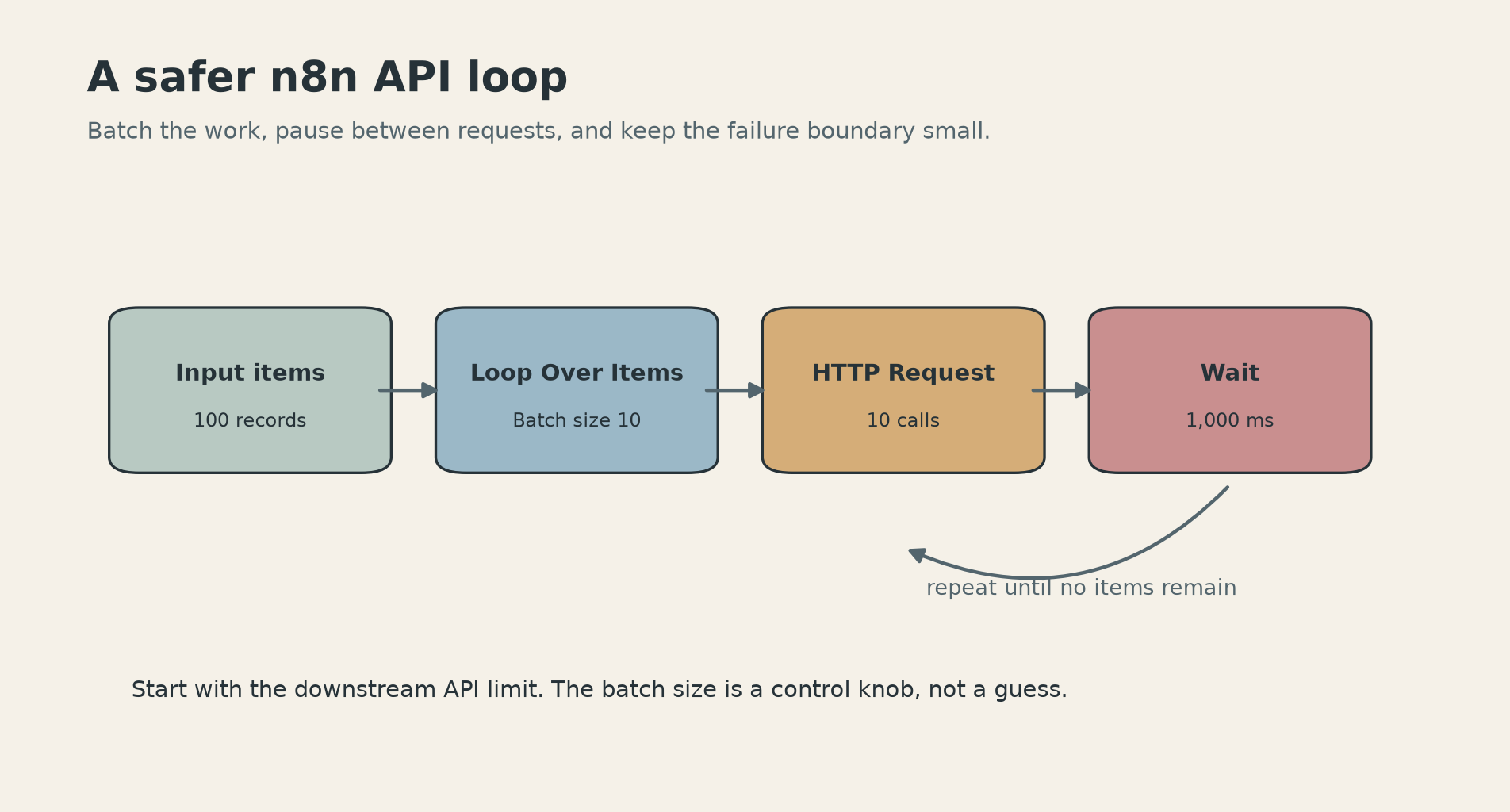
This is a reliability recipe, not a speed hack. You are trading one ugly failure at the end of a run for smaller, inspectable chunks that can finish without taking the whole workflow down.
Pick the batch size from the API limit
Start with the downstream service, not with an n8n setting. Find its requests-per-second or requests-per-minute limit, then work backward.
If the API permits one request per second, begin with Batch Size 1 and a 1,000 ms pause. That is not an arbitrary number: n8n's own rate-limit documentation uses 1,000 ms as the example delay for a service that allows one request per second. The official workflow template follows the same conservative shape. Its Loop Over Items node splits the input into a single item, the HTTP Request node makes the call, and the Wait node sends the loop back for the next item. With 5 items, the template makes five separate calls.
If the API allows 100 requests every 10 seconds, you have more room. A starting point could be Batch Size 10 with a 1,000 ms interval, or Batch Size 20 with a longer pause after each batch. The correct setting depends on what one request contains. Some APIs count calls. Others count records, tokens, or bytes. A batch of 20 records is safe only if the endpoint accepts 20 records and the payload stays below its size limit.
The useful formula is deliberately boring:
requests per interval = batch size / interval
For a one-request-per-second limit, Batch Size 1 and 1,000 ms gives one request per second. If each batch contains 10 requests, the interval has to be long enough to keep the average under the service limit. Leave headroom. A limit of 60 requests per minute is not a target of exactly 60. Network jitter, retries, and other workflows can consume the remaining capacity.
For large records, reduce the batch even when the API permits more. A base64 file or a long document can make a batch look small in the editor while using a lot of memory. The n8n docs recommend splitting large work into smaller pieces when memory becomes a problem. Rate limits and memory limits point to the same first move: make the failure boundary smaller.
The workflow that fails safely
The basic loop is:
- Fetch or receive the items.
- Add Loop Over Items before the API node.
- Set Batch Size to the number of items the API can safely accept.
- Call the API.
- Add Wait after the call when the service limit needs a deliberate pause.
- Connect the Wait node back to Loop Over Items.
- Use the done output to continue after every item has been processed.
That last connection matters. The official template is explicit about it: the Wait node resumes the loop, and the loop continues until the input is exhausted. If you forget the return connection, the workflow can process only the first batch and appear successful while quietly dropping the rest.
n8n's Loop Over Items node is called Split in Batches in older tutorials. The current docs say you can set Batch Size to 1 to process items individually, or use larger groups for a controlled batch. The node stops after all incoming items have been divided and passed onward, so you do not need to bolt on an extra IF node just to detect the end.
There is a shorter option when the HTTP Request node already matches your workflow. Open the node, choose Add Option, then Batching. Set Items per Batch and Batch Interval (ms). n8n describes this as the equivalent of using Loop Over Items and Wait. Use the built-in option when the request is a straight item-to-API operation and you do not need a custom branch inside the loop. Use the explicit loop when you need per-batch logging, conditional handling, a database checkpoint, or a notification between batches.
The two patterns are not interchangeable in one important way: a loop gives you a visible place to handle the result before the next batch. That is worth the extra node when the call writes data or triggers an external side effect.
The retry setting is not your safety net
Retry On Fail is useful for transient errors, but it does not replace batching. n8n's docs describe it as a pause between attempts on a failed request. It does not reduce the initial burst, and it cannot know whether a timed-out request reached the server.
That timeout case is where duplicate work starts. Your POST may have succeeded, but the response got lost. n8n retries. The API receives the same operation again. If the endpoint supports an idempotency key, pass a stable key based on the source record ID and operation name. If it does not, write a processed marker to a database before the next attempt, or make the downstream update an upsert keyed by the source system's ID.
For a cautious first deployment, use these settings:
Batch size: 1 for side effects that cannot be duplicated. Increase only after a test run.
Wait interval: Start at the API's documented window, then add headroom. For a one-request-per-second service, use 1,000 ms as the minimum example and increase it if other traffic shares the credential.
Max tries: Keep it bounded. Three attempts is a reasonable starting point for a transient call, not a law. A permanently invalid request should not loop for minutes.
Continue On Fail: Use it only when the remaining records should continue and you have a real error path. Route failed items to a review queue or a retry workflow. Do not mark them complete because the main workflow reached its done output.
State: For a job that may run for hours, store a stable source ID and status outside the in-memory loop. n8n's static workflow data can store small values such as a last processed timestamp, but the official documentation calls the feature experimental, says it does not persist during manual testing, and warns that high-frequency executions may behave unreliably. That makes it useful for a small cursor, not a full ledger of thousands of records.
When the shortcut is enough
Use HTTP Request batching when you are reading a list, making the same call for each item, and can tolerate a simple linear flow. It keeps the canvas clean and gives you the same two controls: items per batch and interval in milliseconds.
Use Loop Over Items plus Wait when the workflow needs judgment between calls. Examples include checking whether a record is already processed, writing a checkpoint, separating successful and failed items, or pausing longer after a particular response. The extra visibility is more valuable than the saved node count.
Use Batch Size 1 first when the operation sends email, creates a ticket, publishes content, charges money, or changes permissions. Once the workflow has proven that its keys and failure handling work, increase the batch size to improve throughput. Do not start at 100 just because the API says it allows 100 requests. A fast failure is still a failure.
A practical test is to run 25 records, then inspect four things: the number of outbound calls, the time between calls, the number of successful records, and the behavior after a forced 429 or timeout. If the run cannot tell you which record failed, it is not ready for a larger batch. If you want a related example of separating AI decisions from irreversible writes, see this read-only n8n workflow.
The point of batching is not that every workflow should be slow. It is that a workflow should fail in a way you can resume. Start with the API limit, keep the loop linear, make retries bounded, and give every side effect a stable identity. That turns n8n from a request cannon into a small queue you can actually trust.
Sources
- n8n rate-limit documentation: official guidance for Retry On Fail, Loop Over Items, Wait, and the 1,000 ms example
- n8n Loop documentation: how item iteration and Loop Over Items behave
- n8n HTTP Request common issues: official batching and retry settings for 429 errors
- Official n8n batching workflow template: working Loop Over Items plus Wait example with five input items
- n8n large-dataset batching guide: practical batch sizing and failure-boundary examples