A local model can feel useless while running the same weights that impressed you in somebody else's demo. Before downloading a larger checkpoint, assume the plumbing is guilty. Chat formatting, context limits, sampling, thinking mode, and KV cache choices can change the prompt the model sees and the tokens it is willing to produce.
The useful question is not "Which model is smarter?" It is "At which layer did my answer change?" That question gives you a debugging path instead of another evening spent downloading 40 GB of weights.
Symptoms that point to the runtime
The first symptom is a model that answers a simple question well in one interface and badly in another. That usually points at prompt formatting or generation settings, not intelligence. llama.cpp's chat helper reads the tokenizer.chat_template stored in model metadata, then applies a matching template. Ollama exposes a separate TEMPLATE instruction in its Modelfile. If an app supplies its own wrapper, you can end up feeding the model a conversation format it was never trained to read.
A second symptom is the model repeating itself, emitting strange control tokens, or getting trapped in a thinking block. Qwen3-8B is a good example because its model card explicitly supports thinking and non-thinking modes. The card recommends temperature 0.6, top-p 0.95, top-k 20, and min-p 0 for thinking mode. A generic preset copied from another model can make the output look broken even though the weights are fine. The Level1Techs investigation behind this topic describes a similar failure in practical terms: very low temperature can leave a Qwen model looping inside its think output.
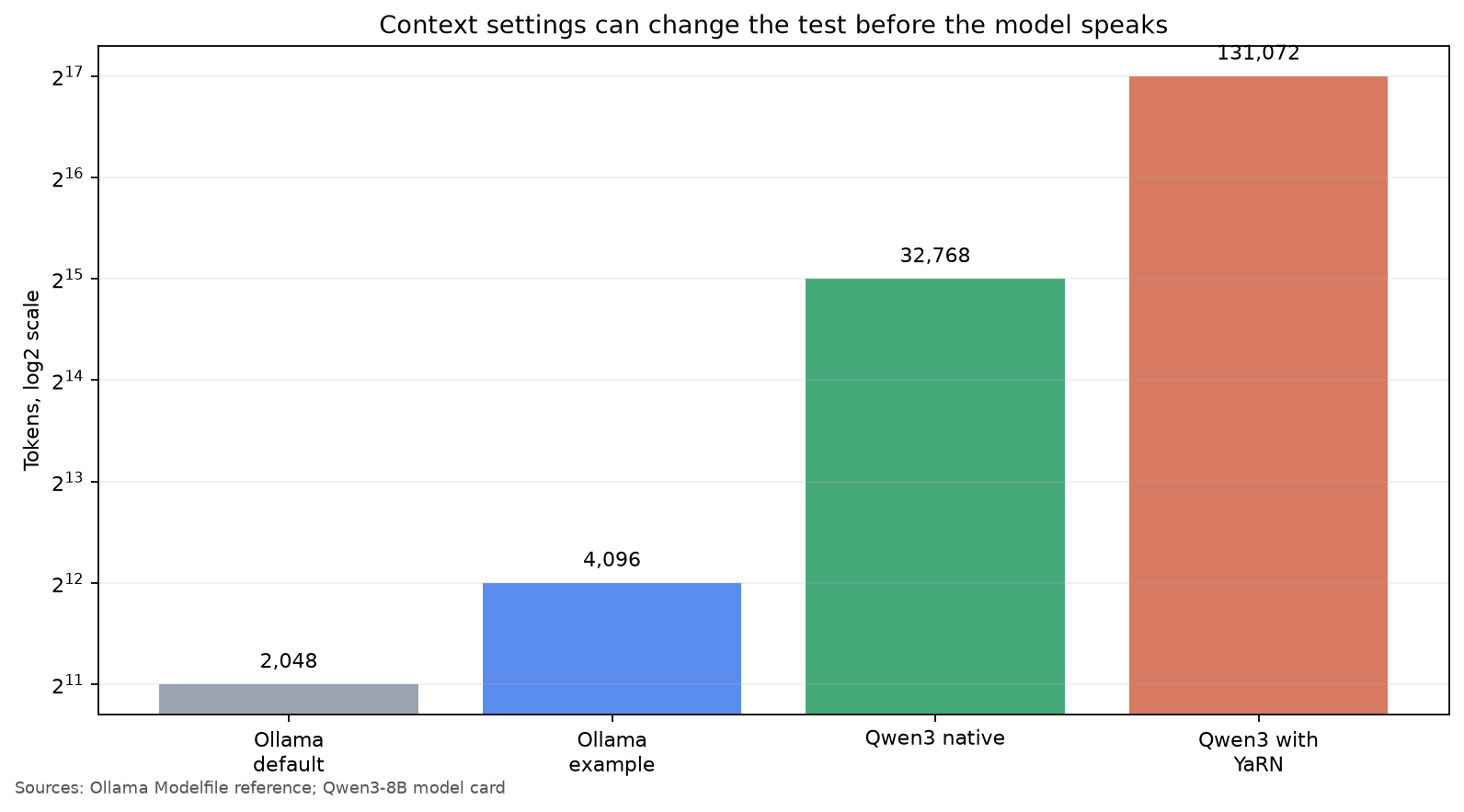
A third symptom appears only on long prompts. Short questions look fine, then a tool call or a long pasted document causes incoherent answers. Check the actual context allocated by the runtime. Ollama's Modelfile reference says its default num_ctx is 2,048 and shows 4,096 as an example. That is a very different test from Qwen3-8B's native 32,768-token context, and it is nowhere near the 131,072 tokens Qwen documents when YaRN is used. The model cannot use context that the serving layer never allocates.
The important distinction is that a large context limit is not a promise of equal quality at every length. The current Level1Techs thread reports a real tool workload of roughly 100k tokens and describes quality divergence after about 40k tokens when KV cache settings and kernels change. That is one investigation, not a universal cutoff. It is still a useful warning: when failure starts only after a particular context size, test the cache and attention backend before blaming the checkpoint.
A repeatable diagnosis
Start with a control prompt short enough to fit everywhere. Use one question with an objectively checkable answer, such as a small arithmetic problem or a request to return a fixed JSON object. Run it through the model's official chat template and through your application. Keep the seed, temperature, top-p, max output, and prompt identical. Do not start with a creative writing prompt. It gives you nothing precise to compare.
Next, inspect the rendered prompt. In llama.cpp, the documented chat template path is based on the model's tokenizer metadata. In Ollama, run Ollama model inspection for MODEL and inspect the TEMPLATE, stop tokens, and parameters. You are looking for duplicated role markers, a missing assistant generation marker, or a stop token that appears in normal text. A wrong template can make a capable model look like it has forgotten instruction tuning.
Then pin the generation settings. For a Qwen3 thinking-mode test, begin with the model card's values instead of a frontend preset:
temperature 0.6
top_p 0.95
top_k 20
min_p 0
For an Ollama Modelfile, make the context explicit while testing:
FROM qwen3:8b
PARAMETER num_ctx 4096
PARAMETER temperature 0.6
PARAMETER top_p 0.95
PARAMETER top_k 20
The point is not that these settings are perfect for every task. The point is that you now have a reproducible baseline. Change one value at a time. If lowering temperature made the model loop, restore it and test the official preset. If the model behaves at 4,096 tokens but fails at 16,000, you have learned something about the runtime rather than the model's general ability.
Measure the prompt budget instead of trusting the UI. Count the input tokens if your client exposes them. Watch the server log for truncation, context allocation, and KV cache format. A screen that says "128K context" may still be running a 4,096-token allocation, or it may be silently dropping the oldest messages. The chart above is deliberately simple because the gap between 2,048 and 32,768 is the first thing to verify.
Finally, repeat the test with a quantization and cache configuration that your runtime officially supports. Do not compare a new quant against an old one while also changing the backend, context size, sampler, and prompt wrapper. That is five experiments disguised as one. If a short control prompt fails with the official template and pinned settings, try the original or higher precision weights. If the short prompt passes and only long tool workloads fail, investigate context length, KV cache quantization, and the attention backend.
Where the model really is the problem
After the runtime passes the control test, the weights deserve suspicion. A smaller model may simply lack the reasoning ability your task needs. A quantized model can also lose enough information to change token choices, especially in long or tool-heavy sequences. But those are later conclusions, not the starting assumption.
This is where the hardware question belongs. If you decide that the quant is the problem, the related guide on choosing a quant that fits your VRAM is the next step. Do not use quantization as a ritual fix for a broken template. More VRAM cannot repair duplicated role tokens or a context window that truncates the task.
There is also a practical limit to what a local setup can prove. The Level1Techs experiment compares low-level runtime behavior with a long, real tool trace, while most quick model tests use three short prompts and greedy decoding. Those tests answer different questions. Passing a trivia prompt tells you that the model can produce a plausible answer. It does not tell you whether it can preserve a tool schema after 40,000 tokens.
My preferred order is boring: official template, short control prompt, explicit context, official sampler, then one variable at a time. It takes less time than another model download, and the result travels with you across Ollama, llama.cpp, desktop chat apps, and agent servers. If the model is still bad after that, at least you are replacing the right thing.
Sources
- Qwen3-8B model card: official chat template examples, thinking-mode settings, and 32,768 native or 131,072 YaRN context limits
- Ollama Modelfile reference:
num_ctx, temperature, repeat controls, templates, and model inspection commands - llama.cpp supported chat templates: how tokenizer metadata and model-specific templates are applied
- Why your local LLM feels dumber than it is: community investigation of kernels, sampling, KV cache, quantization, and long-context divergence